


EmDash CMS: Cloudflare’s TypeScript-Powered WordPress Alternative Explained – WordPress has been powering the internet since 2003. That’s over two decades of PHP spaghetti, plugin roulette, and the quiet existential dread of seeing “96 updates available” in your admin dashboard.
It’s impressive, in the way that a 1998 Toyota Corolla still running on the highway is impressive. Respect, but also, maybe it’s time.
On April 1, 2026, Cloudflare announced EmDash — an open-source CMS built entirely in TypeScript, designed to run serverlessly on Cloudflare Workers, and positioned as the “spiritual successor to WordPress.” Yes, April Fools’ Day. No, it’s not a joke.
Many people across Reddit and other social media platforms thought that this was another April Fools’ joke.
Cloudflare has a habit of launching real products on April 1st (see: the 1.1.1.1 DNS service). The name is a joke.
The project is very much real.
EmDash is currently at v0.1.0 — early developer beta territory. But the architecture, the design decisions, and the philosophy behind it are interesting enough that developers, bloggers, and anyone tired of WordPress’s security circus should be paying attention.
What Is EmDash and Why Does It Exist
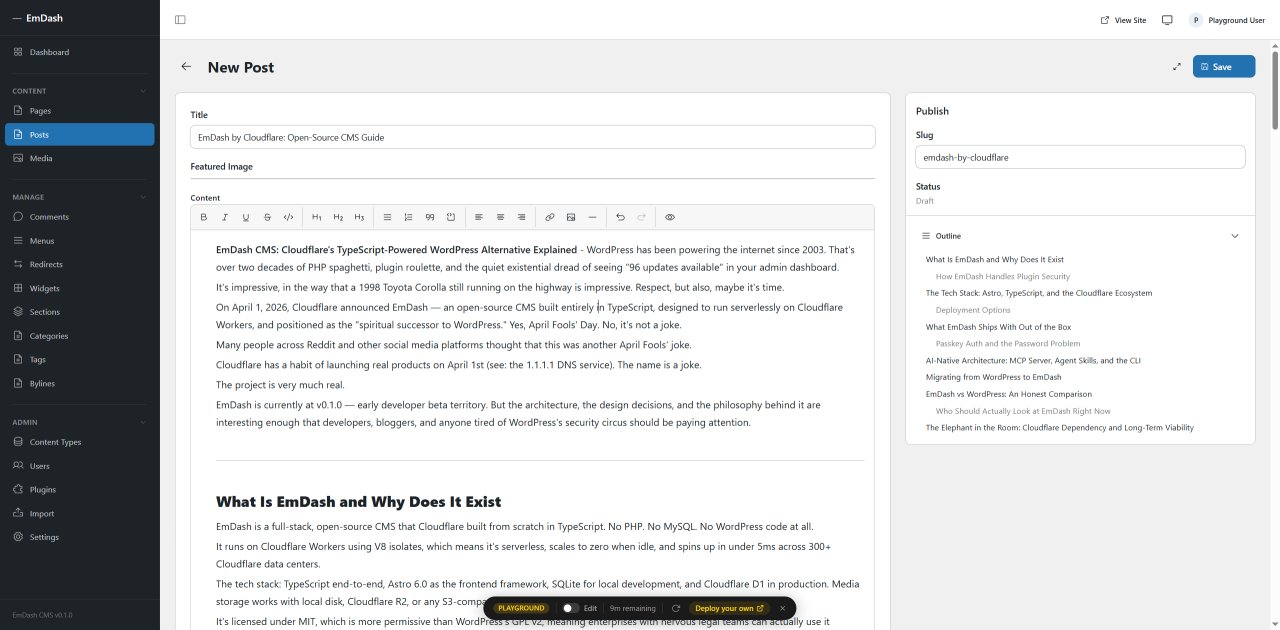
EmDash is a full-stack, open-source CMS that Cloudflare built from scratch in TypeScript. No PHP. No MySQL. No WordPress code at all.
It runs on Cloudflare Workers using V8 isolates, which means it’s serverless, scales to zero when idle, and spins up in under 5ms across 300+ Cloudflare data centers.
The tech stack: TypeScript end-to-end, Astro 6.0 as the frontend framework, SQLite for local development, and Cloudflare D1 in production. Media storage works with local disk, Cloudflare R2, or any S3-compatible service.
It’s licensed under MIT, which is more permissive than WordPress’s GPL v2, meaning enterprises with nervous legal teams can actually use it without calling their lawyers.
The reason Cloudflare built it comes down to one number: 96%. That’s the percentage of WordPress security vulnerabilities that originate from plugins.
In 2025, more high-severity plugin vulnerabilities were found than in the two years before it combined. WordPress’s plugin model is architecturally broken.
A plugin is a PHP script that hooks directly into WordPress with full access to your database and filesystem. You install a plugin, you trust it with everything.
That’s the deal. EmDash was built to fix that deal at the foundation, not patch it with security plugins on top of insecure plugins.
Poetic.
How EmDash Handles Plugin Security
The core innovation in EmDash is sandboxed plugins called Dynamic Workers. Each plugin runs in its own isolated V8 isolate, completely separate from the core CMS and from every other plugin.
Plugins must declare their capabilities explicitly in a manifest, similar to how Android or iOS apps declare permissions.
Here’s a simple example of what a plugin manifest looks like:
import { definePlugin } from "emdash";

export default () =>
  definePlugin({
    id: "notify-on-publish",
    version: "1.0.0",
    capabilities: ["read:content", "email:send"],
    hooks: {
      "content:afterSave": async (event, ctx) => {
        if (event.content.status !== "published") return;
        await ctx.email!.send({
          to: "[email protected]",
          subject: `Published: ${event.content.title}`,
          text: `"${event.content.title}" is now live.`,
        });
      },
    },
  });
That plugin can read content and send emails. That’s it.
It cannot touch the database beyond what read:content allows. It cannot write to the filesystem.
It cannot inject arbitrary JavaScript into the admin UI. You declare what you need; you get exactly that and nothing more.
This is not a WordPress plugin with a security scanner bolted on. This is architectural isolation.
A compromised plugin in EmDash can only damage what it was explicitly allowed to access. A compromised WordPress plugin can take down your entire site, steal user data, and leave a backdoor.
These are fundamentally different risk profiles.
It’s also worth noting that EmDash themes follow the same sandbox philosophy. Unlike WordPress where functions.php is essentially an all-access execution environment, EmDash themes cannot perform database operations at all.
A major attack surface, gone.
The Tech Stack: Astro, TypeScript, and the Cloudflare Ecosystem
EmDash is technically an Astro integration. You add it to your astro.config.mjs, and you get a complete CMS: admin panel, REST API, authentication, media library, and the plugin system.
Technically, integrating it looks like this:
// astro.config.mjs
import emdash from "emdash/astro";
import { d1 } from "emdash/db";

export default defineConfig({
  integrations: [emdash({ database: d1() })],
});
Content types in EmDash are defined in the database, not in code files. Non-developers can create and modify collections through the admin UI.
Each collection gets a real SQL table with typed columns, and developers can generate TypeScript types from the live schema. This is a cleaner approach than WordPress’s ACF-dependent custom field system, which has been a third-party plugin feature for over a decade despite being a fundamental CMS requirement.
Content itself is stored as Portable Text, structured JSON rather than raw HTML blobs. This means AI agents, scripts, and external tools can read and modify content without parsing messy HTML strings.
If you’ve ever tried to programmatically parse WordPress post content and ended up sobbing into your terminal, you’ll appreciate this immediately.
If you want to explore how AI is increasingly shaping the way developers build and interact with tools, the best agentic IDEs in 2026 post covers the tooling landscape that makes AI-first workflows like EmDash’s possible.
Deployment Options
EmDash runs best on Cloudflare, but it’s not locked to it. Deployment options include Cloudflare Workers, Netlify, Vercel, and any modern Node.js server.
The Cloudflare integration is the most polished, using D1 for the database and R2 for storage. Other hosts work, though the sandboxed plugin feature currently requires Cloudflare’s runtime.
This is worth understanding clearly: if you self-host on a Node.js server today, you lose sandboxed plugin execution. Cloudflare is the “best path” for the full feature set, which is not surprising given who built it.
The MIT license is genuinely open. The architecture does lean toward the Cloudflare ecosystem.
What EmDash Ships With Out of the Box
This is where things get legitimately interesting, especially if you’ve spent years assembling a WordPress stack that requires five plugins to do things that a CMS should just… do.
EmDash ships with the following built in, no plugins required:
- SEO controls — metadata fields and structured data hooks
- Internationalization (i18n) — multi-language support natively
- Redirect management — built directly into the admin panel
- Full-text search — no Elasticsearch plugin needed
- Custom content types — typed fields and dedicated database tables, no ACF required
- Role-based access control — Admin, Editor, Author, and Contributor roles
- Passkey authentication — no passwords by default, no brute-force attack vectors
- x402 Payment support — charge AI agents (or any client) per content request
That last one deserves its own paragraph. x402 is an open HTTP-native micropayment standard.
In EmDash, you can configure which content requires payment, set a price, provide a wallet address, and AI agents browsing your content will automatically receive HTTP 402 responses and pay on demand. No subscriptions, no engineering work, no intermediaries.
As AI agents increasingly consume web content without a human ever loading a page, the traditional ad-revenue model gets hollowed out. EmDash is betting that machine-to-machine micropayments are a coming primitive.
Whether that bet pays off is genuinely unclear, but it’s the most forward-looking feature in the release.
Passkey Auth and the Password Problem
WordPress authentication is username and password by default, which means brute-force attacks are a permanent background noise of owning a WordPress site. EmDash uses passkeys by default, with emailed magic links as a fallback.
No passwords. No brute-force vector.
This one change alone would make millions of WordPress admins breathe easier, though it comes with its own early-beta edge cases — some users reported passkey and magic link issues in local Linux setups during early testing.
AI-Native Architecture: MCP Server, Agent Skills, and the CLI
EmDash isn’t just AI-compatible. The design decisions assume AI agents are first-class users of the system.
Every EmDash instance ships with a built-in MCP (Model Context Protocol) server, which means AI coding agents like Claude, ChatGPT, and Cursor can connect directly to an EmDash installation and create content types, manage entries, configure plugins, and deploy, all programmatically.
The EmDash CLI outputs JSON, designed for agent consumption rather than human reading. Documentation is structured as “Agent Skills,” written for machines to parse rather than tutorials formatted for human skimming.
Content exported to Markdown can be edited by an agent and re-imported without data loss. The AI Site Generation Playground can generate full sites with a theme, content schema, and seed content from a text prompt.
This is a different philosophy from WordPress’s AI integration story, which is essentially: install the WPGraphQL plugin, hope it works with your theme, add an AI writing plugin that generates medium SEO content, and call it done. EmDash’s AI integration is baked into the architecture rather than layered on top.
If you’re interested in building with AI APIs, the Anthropic Claude API practical guide covers how to work with the same protocols that power EmDash’s MCP integration at the API level.
Migrating from WordPress to EmDash
EmDash supports two WordPress migration paths. The first is WXR import, the standard WordPress export format — export from your WordPress admin, import into EmDash.
The second is the EmDash Exporter Plugin, which you install on your existing WordPress site. It sets up a secure endpoint protected by a WordPress Application Password, letting EmDash pull your content directly.
Custom post types can be mapped to EmDash content collections. Attached media imports into EmDash’s media library automatically.
What the migration does not cover is your plugin and theme logic. WordPress plugins are PHP.
EmDash plugins are TypeScript. WordPress themes use functions.php.
EmDash themes are Astro projects. Migrating content is straightforward; migrating a complex plugin-heavy site is a rebuild, not a transfer.
If your site runs twenty plugins, expect to re-evaluate each one, not export-import it.
EmDash provides agent skills specifically designed to help AI coding agents port WordPress themes and plugins to EmDash’s format. The tooling is there.
The time investment is still real.
If you’re familiar with how WordPress handles functionality through plugins, the WordPress Abilities API post on WordPress 6.9+ gives useful context for how WordPress itself is evolving its own extension model.
EmDash vs WordPress: An Honest Comparison
Here’s the full picture without the press release energy.
| Factor | EmDash | WordPress |
|---|---|---|
| Language | TypeScript | PHP |
| Plugin security | Sandboxed V8 isolate per plugin | Shared PHP process, full access |
| Custom fields | Built-in, typed schema | Requires ACF or similar plugin |
| SEO | Built-in | Requires Yoast or RankMath |
| i18n | Built-in | Requires WPML or Polylang |
| Redirects | Built-in | Requires plugin |
| Content format | Portable Text (structured JSON) | HTML in MySQL |
| Authentication | Passkey by default | Username/password |
| AI integration | Native MCP server + CLI | Via plugins |
| Hosting | Serverless, scale-to-zero | Always-on PHP/MySQL server |
| License | MIT | GPL v2 |
| Plugin ecosystem | Empty (v0.1.0 beta) | 60,000+ plugins |
| Theme ecosystem | Empty (v0.1.0 beta) | 14,000+ themes |
| Maturity | 2 months, beta | 24 years, battle-tested |
EmDash wins on architecture, security model, built-in features, and forward-looking design. WordPress wins on ecosystem, maturity, community, documentation, hosting support, and the fact that millions of developers already know it.
The honest summary: EmDash is the CMS you’d design if you could start over today with full knowledge of where WordPress failed. WordPress is the CMS that actually runs 43% of the internet right now.
Those two facts don’t cancel each other out — they just live in different time zones.
Who Should Actually Look at EmDash Right Now
If you’re a developer who works with TypeScript regularly, builds on Cloudflare Workers, and wants to set up a new project without the WordPress plugin management overhead, EmDash is worth evaluating seriously today. The playground is live, the demo runs locally without a Cloudflare account, and the core features are functional enough to test.
If you run a production WordPress site with a real plugin stack, real clients, and a real business attached to it, EmDash is one to watch but not yet deploy. Zero plugin ecosystem, zero community, two months of existence, and early-beta stability.
That’s not a project you put under a live business yet.
If you want to get started locally, it’s as simple as:
npm create emdash@latest
Or you can try the admin interface directly at the playground: playground.emdash.dev
The Elephant in the Room: Cloudflare Dependency and Long-Term Viability
The MIT license is genuine and permissive. The architecture supports Node.js and other platforms.
But the honest observation is that EmDash is built by Cloudflare, optimized for Cloudflare’s runtime, and the most compelling features (sandboxed plugins, D1 database, R2 storage, scale-to-zero) work best on Cloudflare infrastructure.
This is not inherently bad. Cloudflare is a serious company with serious infrastructure.
But it does mean that adopting EmDash is also, to some degree, adopting a closer relationship with the Cloudflare ecosystem. If Cloudflare’s priorities shift, if the team that built this gets reassigned, or if the project doesn’t gain community traction fast enough, the governance situation is unclear in a way that WordPress’s Apache-licensed, community-governed model is not.
Matt Kane, the lead engineer on EmDash, addressed this directly: “The effort needed to be certain it was safe to MIT license EmDash really drove home why it was important to MIT license it. For a lot of enterprises, GPL software is free only if your lawyers are free.”
The project is real, the codebase is public, and the GitHub repository is active. The rest is a bet on momentum and community adoption — the same bet every open-source project starts with.
Frequently Asked Questions (FAQs)
Can EmDash replace WordPress for my current site?
For new projects built by TypeScript developers comfortable with Cloudflare Workers, EmDash is a serious option.
For existing WordPress sites with plugin-heavy setups, migration requires rebuilding plugin and theme logic, not just exporting content.
It’s a complete platform switch, not a one-click transfer.
Does EmDash work without a Cloudflare account?
Yes, for local development and basic hosting. Run the demo locally with Node.js and SQLite without a Cloudflare account.
However, sandboxed plugin execution currently requires Cloudflare’s runtime, so self-hosted Node.js deployments lose that security feature for now.
Is EmDash production-ready?
Not yet. It’s v0.1.0 in early developer beta. The architecture is sound and the core features work, but the plugin and theme ecosystems are empty, community documentation is minimal, and early testers have hit edge cases.
It’s worth experimenting with on personal projects and new builds. Production workloads should wait for a more mature release.