


Python Exercises for Beginners With Real Projects You Can Actually Use – Learning Python by writing a calculator that adds two numbers feels about as useful as learning to drive by sitting in a parked car. You are technically doing something, but you are not going anywhere.
What you actually need is friction.
You need problems that mean something, the kind of code you would write if you were solving a problem that mattered right now, not in some hypothetical future where you magically became a software engineer.
The exercises in this post are not academic puzzles.
They are built around scenarios you would actually encounter: tracking money, organizing data, automating repetitive tasks, building small tools that save you time.
Each one teaches a core Python concept through something concrete.
No abstract foo and bar variables. No calculating the area of imaginary triangles. You will write code that does real work, even if that work starts small.
Work through these in order. Each section adds to what came before. By the end, you will have built a proper multi-function expense tracker from scratch, which is more than most Python tutorial sequences give you after ten chapters.
If you are completely new to Python, the Getting Started With Python Programming guide covers environment setup and the very basics before you touch any of this.
TLDR
Hide- Every exercise is grounded in a real scenario rather than abstract theory, covering projects like a coffee shop revenue tracker, freelance invoice status checker, gym workout counter, blog SEO content filter, restaurant finder, contact book, password strength checker, and a persistent personal finance logger.
- The post covers all core Python fundamentals in sequence: variables and data types, conditionals with
if/elif/else,forandwhileloops, functions with default parameters and return values, list comprehensions, dictionaries, string processing with regex, file I/O withopen()and thecsvmodule, andtry/excepterror handling. - Each section ends with an extension exercise that combines the new concept with skills from earlier sections, deliberately forcing you to connect ideas rather than apply them in isolation, which is how real programming problems actually arrive.
- The capstone project is a complete expense tracking system that uses all previously covered concepts together: functions, dictionaries, file persistence, CSV export, error handling, per-category budget warnings, and formatted terminal reports.
- File operations are treated as a first-class skill rather than an afterthought, with exercises covering append mode, duplicate removal,
os.path.exists()safety checks, timestamped entries, and CSV read/write usingDictReaderandDictWriter. - Struggle time is emphasized as a core part of the learning process. The recommended approach is a minimum of ten minutes of genuine attempt before checking any solution, followed by rewriting it from memory rather than copying it.
- For continued practice beyond this post, Pynative, Exercism, W3Resource, and Real Python are recommended in that order, each serving a different need: structured progression, mentored code review, sheer volume of problems, and full project-length tutorials respectively.
20+ Python Projects for Beginners to Exercise Your Python Skills

Most Python tutorials for beginners start with abstract exercises that feel completely disconnected from anything you would actually build. This post takes a different approach.
Every exercise is built around a real-world scenario: tracking daily expenses, splitting restaurant bills, filtering blog posts by SEO readiness, generating URL slugs, checking password strength, logging freelance invoices, and building a full multi-function expense tracker with CSV persistence.
Each section introduces one core Python concept, from variables and conditionals through to file operations and error handling, and pairs it with two working project examples you can run, break, and extend immediately.
The exercises build on each other deliberately, so by the end you have not just practiced isolated syntax but assembled the building blocks of something that actually works.
Starting Python Exercises with the Basics: Variables That Store Something Useful
Variables are containers for data. Nothing more mysterious than that. Python gives you four basic types to start with: integers for whole numbers, floats for decimals, strings for text, and booleans for true/false values.
The real skill is learning how to combine them to represent something from the actual world.
Think about planning a trip. You need to know the destination, how many days you are staying, and what you can spend each day.
Three pieces of information, three variables, all working together to produce something useful: your total budget.
Project #1: Trip Budget Calculator
destination = "Bangkok"
days = 7
daily_budget = 3500.00  # in THB
total_budget = days * daily_budget

print(f"Trip to {destination}: {total_budget:.2f} THB for {days} days")
The f before the string is an f-string, and it lets you inject variables directly into text. The :.2f part formats the number to two decimal places. Clean, readable, exactly what you want.
Your exercise: Make this interactive. Modify the code to ask the user for the destination, number of days, and daily budget using input(). Convert the numeric inputs with int() or float(), since Python treats everything typed by a user as a string by default. Then calculate and print the total. Try typing “five” instead of 5 and watch what happens. That error is your first lesson in input validation.
Project #2: Coffee Shop Daily Revenue Tracker
Here is another variable exercise that feels more like a real small business problem.
shop_name = "Beanery Corner"
cups_sold = 134
price_per_cup = 4.50
rent_daily = 120.00
staff_cost = 85.00

revenue = cups_sold * price_per_cup
expenses = rent_daily + staff_cost
profit = revenue - expenses

print(f"{shop_name} Daily Report")
print(f"Revenue  : ${revenue:.2f}")
print(f"Expenses : ${expenses:.2f}")
print(f"Profit   : ${profit:.2f}")
Your exercise: Add a variable for the cost of supplies per cup (say, $1.20 per cup). Subtract total supply cost from the profit. Then add a tax rate of 8.5% and calculate the after-tax profit. Print all values formatted neatly with dollar signs and two decimal places.
Now, there are two real-world Python exercises for complete beginners already you can try right now.
Making Decisions: When Your Code Needs to React
Programs that do the same thing every time are not programs, they are scripts with ambition problems. Conditionals let your code react differently based on what it encounters. The if/elif/else structure is how you build decision-making into everything you write.
Project #3: Hotel Rate Evaluator
Hotel prices mean different things depending on the city. A $50 room in Tokyo is a miracle. The same price in rural Portugal is standard. Your code can categorize this automatically.
city = input("Enter city: ")
price = float(input("Enter nightly hotel rate (USD): "))
nights = int(input("How many nights? "))

if price < 40:
    tier = "Budget"
    comment = "Check the reviews before you commit."
elif price < 120:
    tier = "Mid-range"
    comment = "Decent shower, probably working Wi-Fi."
elif price < 280:
    tier = "Business class"
    comment = "Expect a proper breakfast and actual pillows."
else:
    tier = "Luxury"
    comment = "Someone else is probably paying for this."

subtotal = price * nights
tax = subtotal * 0.10
total = subtotal + tax

print(f"\n{city} Hotel Report")
print(f"Tier     : {tier} - {comment}")
print(f"Subtotal : ${subtotal:.2f}")
print(f"Tax (10%): ${tax:.2f}")
print(f"Total    : ${total:.2f}")
Your exercise: Add a loyalty discount. If the user has stayed more than 5 nights total (ask them), apply a 12% discount to the total before tax. Print the discount amount as its own line so the user can see what they saved.
Project #4: Freelance Invoice Status Checker
This one is practical if you do any kind of freelance or contract work.
invoice_amount = float(input("Invoice amount (USD): "))
days_overdue = int(input("Days since due date (0 if on time): "))

if days_overdue == 0:
    status = "Paid on time"
    late_fee = 0
elif days_overdue <= 7:
    status = "Slightly late"
    late_fee = invoice_amount * 0.02
elif days_overdue <= 30:
    status = "Late - fee applies"
    late_fee = invoice_amount * 0.05
else:
    status = "Seriously overdue"
    late_fee = invoice_amount * 0.10

total_owed = invoice_amount + late_fee

print(f"\nInvoice Status: {status}")
print(f"Original Amount: ${invoice_amount:.2f}")
print(f"Late Fee       : ${late_fee:.2f}")
print(f"Total Owed     : ${total_owed:.2f}")
Your exercise: Add a condition that prints a reminder message if the invoice is over 60 days overdue. The message should suggest sending a formal demand letter. Also add an input() that asks for the client name and include it in all printed output.
Repeating Actions Without Losing Your Mind: Loops
Loops handle repetition so you don’t have to copy and paste code like someone who has never heard of programming. The for loop iterates over sequences, hitting each item once. The while loop keeps running until a condition flips to false. Both are powerful, and both serve genuinely different purposes.
Project #5: Multi-Day Itinerary Generator
Planning a trip means organizing activities by day. You could write each day out manually, or you could let a loop build the entire schedule.
activities = [
    "Grand Palace and Wat Phra Kaew",
    "Chatuchak Weekend Market",
    "Wat Pho and boat ride along Chao Phraya",
    "Rooftop bar sunset at Lebua",
    "Ayutthaya ancient ruins day trip",
    "Street food tour in Chinatown",
    "Lumphini Park morning and MBK shopping"
]

print("Bangkok 7-Day Itinerary")
print("-" * 30)
for day, activity in enumerate(activities, start=1):
    print(f"Day {day}: {activity}")
The enumerate() function gives you both the item and its position at the same time. Starting from 1 instead of 0 makes the output human-readable, because nobody says “Day 0” when talking about a vacation unless they are being difficult.
Your exercise: Add a while loop version below the for loop. Ask the user to type activity names one at a time and press Enter. When they type done, stop collecting input and print the full itinerary. You will need an empty list to start, a loop that keeps running, and an if statement to break out at the right moment. This is where beginners usually get stuck. That is the point.
Project #6: Gym Workout Repetition Counter
exercises = ["Push-ups", "Squats", "Plank hold", "Burpees", "Mountain climbers"]
reps = [20, 30, 45, 15, 25]
sets = 3

print(f"Today's Workout - {sets} sets")
print("-" * 35)
for i, (exercise, rep) in enumerate(zip(exercises, reps), start=1):
    total_reps = rep * sets
    print(f"{i}. {exercise:<22} {rep} reps x {sets} sets = {total_reps} total")
zip() pairs two lists together, so you get the exercise name and its rep count at the same time. The :<22 in the f-string left-aligns the text and pads it to 22 characters wide, keeping columns neat.
Your exercise: Add a while loop at the bottom that asks the user which exercise they just completed. Each time they enter one, mark it as done in a separate list. Keep looping until all exercises are marked complete, then print a congratulations message with the total rep count for the session.
Functions: Writing Code You Can Use Again and Again
Functions are named blocks of code that accept inputs and return outputs. They let you write something once and call it from anywhere. Every program longer than twenty lines needs functions, or it becomes a tangled disaster that you will refuse to touch six months later.
Project #7: Currency Converter with Multiple Rates
Travelers deal with currency conversion constantly. A function handles the math consistently without repeating yourself.
def convert_currency(amount, from_currency, to_currency, rates):
    if from_currency not in rates or to_currency not in rates:
        return f"Currency not found: {from_currency} or {to_currency}"
    amount_in_usd = amount / rates[from_currency]
    converted = amount_in_usd * rates[to_currency]
    return round(converted, 2)

exchange_rates = {
    "USD": 1.0,
    "THB": 35.5,
    "EUR": 0.92,
    "GBP": 0.79,
    "JPY": 149.5,
    "SGD": 1.34
}

pairs = [
    (1000, "THB", "USD"),
    (100, "USD", "JPY"),
    (50, "EUR", "GBP"),
    (200, "SGD", "THB"),
]

for amount, frm, to in pairs:
    result = convert_currency(amount, frm, to, exchange_rates)
    print(f"{amount} {frm} = {result} {to}")
Your exercise: Add a function called best_exchange_deal(amount, from_currency, rates) that converts a given amount from one currency to all other currencies in the rates dictionary, then prints a sorted list from highest to lowest converted value. This helps a traveler see which destination gives them the most purchasing power.
Project #8: Discount Price Calculator for E-Commerce
def discount_price(original, percent):
    if percent < 0 or percent > 100:
        return "Invalid discount percentage."
    saving = original * (percent / 100)
    final = original - saving
    return round(final, 2)

def print_price_tag(item_name, original, percent):
    final = discount_price(original, percent)
    saving = round(original - final, 2)
    print(f"{item_name}")
    print(f"  Original  : ${original:.2f}")
    print(f"  Discount  : {percent}% off")
    print(f"  You save  : ${saving:.2f}")
    print(f"  Pay now   : ${final:.2f}")
    print()

products = [
    ("Sony WH-1000XM5 Headphones", 349.99, 20),
    ("Mechanical Keyboard", 129.00, 15),
    ("Portable SSD 1TB", 89.99, 30),
    ("USB-C Hub", 45.00, 25),
]

for name, price, pct in products:
    print_price_tag(name, price, pct)
Your exercise: Add a function called apply_coupon(price, coupon_code) that takes the already-discounted price and applies an additional flat discount based on a coupon. Define at least three coupon codes with different discount amounts in a dictionary. If the code is invalid, return the original price unchanged and print a polite error message.
Working with Collections: Lists and Comprehensions
Lists store multiple items in order. You can change them, sort them, filter them, and transform them in a single line using list comprehensions. That single line replaces what would otherwise be a full for loop with an if condition inside it.
Project #9: Blog Post SEO Content Filter
You run a blog and you need to identify which posts are long enough to rank well, which ones need updating, and which ones should be merged or deleted.
posts = [
    {"title": "Python for Absolute Beginners", "words": 2850, "published": 2024},
    {"title": "Quick Git Tips", "words": 420, "published": 2022},
    {"title": "FastAPI in 10 Minutes", "words": 1650, "published": 2023},
    {"title": "Understanding Async Python", "words": 3100, "published": 2025},
    {"title": "Setting Up VSCode", "words": 610, "published": 2022},
    {"title": "Docker Basics", "words": 1900, "published": 2023},
    {"title": "REST API Design Patterns", "words": 2400, "published": 2024},
    {"title": "Debugging Python Scripts", "words": 780, "published": 2023},
]

# Posts long enough to rank
rankable = [p["title"] for p in posts if p["words"] >= 1500]

# Thin content that needs updating
thin = [p["title"] for p in posts if p["words"] < 800]

# Old posts that should be refreshed
stale = [p["title"] for p in posts if p["published"] <= 2022]

avg_words = sum(p["words"] for p in posts) / len(posts)

print(f"Total posts       : {len(posts)}")
print(f"Average word count: {avg_words:.0f}")
print(f"\nRankable posts    : {rankable}")
print(f"\nThin content      : {thin}")
print(f"\nStale posts       : {stale}")
Your exercise: Write a function seo_audit(posts, min_words, cutoff_year) that returns a dictionary with three keys: strong, needs_update, and low_priority. Categorize each post based on both word count and publication year. A post is strong if it has enough words and was published recently. Old posts with good word counts need updating. Short old posts are low priority. Print a clean summary report.
Project #10: Student Grade Manager
students = [
    {"name": "Aisha", "scores": [88, 92, 79, 95, 84]},
    {"name": "Carlos", "scores": [72, 68, 75, 80, 71]},
    {"name": "Priya", "scores": [95, 98, 91, 97, 99]},
    {"name": "Jordan", "scores": [55, 60, 58, 63, 57]},
    {"name": "Yuki", "scores": [83, 87, 90, 82, 88]},
]

def get_grade(average):
    if average >= 90:
        return "A"
    elif average >= 80:
        return "B"
    elif average >= 70:
        return "C"
    elif average >= 60:
        return "D"
    else:
        return "F"

print(f"{'Name':<12} {'Average':>8} {'Grade':>6}")
print("-" * 28)
for student in students:
    avg = sum(student["scores"]) / len(student["scores"])
    grade = get_grade(avg)
    print(f"{student['name']:<12} {avg:>8.1f} {grade:>6}")

top_students = [s["name"] for s in students
                if sum(s["scores"]) / len(s["scores"]) >= 85]
print(f"\nHonor roll: {', '.join(top_students)}")
Your exercise: Add a function that finds the highest and lowest scoring student. Then write a function that returns the class average and prints whether each student is above or below it.
Dictionaries: Structured Data for Structured Thinking
Dictionaries store key-value pairs. Instead of accessing items by position like in a list, you access them by name. This makes them perfect for representing real-world objects with multiple properties.
Project #11: Restaurant Finder with Rating Filter
restaurants = [
    {"name": "Som Tam Nua", "cuisine": "Thai", "location": "Siam", "rating": 4.7, "price_range": "$"},
    {"name": "Gaggan Anand", "cuisine": "Progressive Indian", "location": "Phrom Phong", "rating": 4.9, "price_range": "$$$$"},
    {"name": "The Local", "cuisine": "Traditional Thai", "location": "Asok", "rating": 4.5, "price_range": "$$"},
    {"name": "Nara Thai", "cuisine": "Thai", "location": "Central World", "rating": 4.2, "price_range": "$$"},
    {"name": "Oyster Bar", "cuisine": "Seafood", "location": "Thonglor", "rating": 4.6, "price_range": "$$$"},
]

def find_restaurants(restaurant_list, min_rating, cuisine=None):
    filtered = [
        r for r in restaurant_list
        if r["rating"] >= min_rating
        and (cuisine is None or r["cuisine"].lower() == cuisine.lower())
    ]
    return sorted(filtered, key=lambda r: r["rating"], reverse=True)

def display_restaurants(restaurant_list):
    if not restaurant_list:
        print("No restaurants found matching your criteria.")
        return
    for r in restaurant_list:
        stars = round(r["rating"])
        print(f"{r['name']} ({r['cuisine']})")
        print(f"  Location : {r['location']}")
        print(f"  Rating   : {r['rating']} {'*' * stars}")
        print(f"  Price    : {r['price_range']}")
        print()

print("Top-rated restaurants (4.5 and above):")
results = find_restaurants(restaurants, 4.5)
display_restaurants(results)
Your exercise: Add a "vegetarian_friendly" boolean key to each restaurant dictionary. Write a function vegetarian_options(restaurant_list, min_rating) that returns only vegetarian-friendly restaurants above a given rating, sorted by price range from cheapest to most expensive.
Project #12: Personal Contact Book
contact_book = {}

def add_contact(name, phone, email, city):
    contact_book[name.lower()] = {
        "name": name,
        "phone": phone,
        "email": email,
        "city": city
    }
    print(f"Contact '{name}' added.")

def find_contact(name):
    contact = contact_book.get(name.lower())
    if contact:
        for key, value in contact.items():
            print(f"  {key.capitalize()}: {value}")
    else:
        print(f"No contact found for '{name}'.")

def contacts_by_city(city):
    matches = [c for c in contact_book.values()
               if c["city"].lower() == city.lower()]
    if matches:
        print(f"Contacts in {city}:")
        for c in matches:
            print(f"  {c['name']} - {c['phone']}")
    else:
        print(f"No contacts in {city}.")

add_contact("Maria Santos", "+63-917-555-1234", "[email protected]", "Manila")
add_contact("Kenji Tanaka", "+81-90-5555-6789", "[email protected]", "Tokyo")
add_contact("Amara Diallo", "+225-0700-111222", "[email protected]", "Abidjan")
add_contact("Sofia Eriksson", "+46-70-555-9900", "[email protected]", "Stockholm")

find_contact("Kenji Tanaka")
contacts_by_city("Manila")
Your exercise: Add an update_contact(name, field, new_value) function that lets you change a single field for an existing contact. Then add a delete_contact(name) function with a confirmation prompt before deletion. This is essentially a mini CRUD application, which is the foundation of almost every real-world app ever built.
Text Processing: Making Strings Do What You Want
Strings come loaded with built-in methods for transforming text: lowercase conversion, whitespace stripping, character replacement, and splitting into lists. These methods are how you clean data and prepare it for actual use.
Project #13: URL Slug Generator for Blog Posts
Every blog post URL needs a clean slug. Spaces become hyphens, uppercase becomes lowercase, special characters vanish entirely.
import re

def generate_slug(title, max_length=60):
    slug = title.lower().strip()
    slug = slug.replace(" ", "-")
    slug = re.sub(r"[^a-z0-9-]", "", slug)
    slug = re.sub(r"-+", "-", slug)  # collapse multiple hyphens
    return slug[:max_length].rstrip("-")

def word_count(text):
    words = text.split()
    return len(words)

def reading_time(text, wpm=200):
    count = word_count(text)
    minutes = count / wpm
    return max(1, round(minutes))

titles = [
    "Best Python Libraries for Data Science in 2025!",
    "How to Deploy FastAPI on DigitalOcean: A Step-by-Step Guide",
    "VS Code Extensions Every Developer Should Know (Updated)",
    "Async/Await in Python 3.12 -- What's New & Why It Matters??",
]

sample_text = """Python is one of the most popular programming languages in the world.
It powers everything from web applications to machine learning pipelines.
Beginners love it for its readable syntax. Professionals stay because
of its ecosystem. The community is enormous and the libraries are endless."""

print("Slug Generator Output:")
print("-" * 50)
for title in titles:
    print(f"Title : {title}")
    print(f"Slug  : {generate_slug(title)}")
    print()

print(f"Sample text word count  : {word_count(sample_text)} words")
print(f"Estimated reading time  : {reading_time(sample_text)} minute(s)")
Your exercise: Write a function batch_slugs(title_list) that returns a list of dictionaries, each containing the original title, the generated slug, and a warning flag if the slug was truncated. Then write a check_duplicate_slugs(slug_list) function that detects and reports any duplicate slugs in the batch.
Project #14: Password Strength Checker
import re

def check_password_strength(password):
    score = 0
    feedback = []

    if len(password) >= 12:
        score += 2
    elif len(password) >= 8:
        score += 1
    else:
        feedback.append("Too short. Use at least 8 characters.")

    if re.search(r"[A-Z]", password):
        score += 1
    else:
        feedback.append("Add at least one uppercase letter.")

    if re.search(r"[a-z]", password):
        score += 1
    else:
        feedback.append("Add at least one lowercase letter.")

    if re.search(r"\d", password):
        score += 1
    else:
        feedback.append("Add at least one number.")

    if re.search(r"[!@#$%^&*(),.?\":{}|<>]", password):
        score += 2
    else:
        feedback.append("Add at least one special character.")

    if score >= 6:
        strength = "Strong"
    elif score >= 4:
        strength = "Medium"
    else:
        strength = "Weak"

    return {"strength": strength, "score": score, "feedback": feedback}

test_passwords = ["pass", "Password1", "S3cur3P@ssw0rd!", "hello123", "Xy!9qLmZ#2vR"]

for pwd in test_passwords:
    result = check_password_strength(pwd)
    print(f"Password : {'*' * len(pwd)} ({len(pwd)} chars)")
    print(f"Strength : {result['strength']} (score: {result['score']}/7)")
    if result["feedback"]:
        for tip in result["feedback"]:
            print(f"  - {tip}")
    print()
Your exercise: Add a check that flags passwords containing common words like “password”, “admin”, “123456”, or “qwerty”. Store these in a list and check if any substring of the password matches. Reduce the score by 2 if a common pattern is found and add a specific warning message.
File Operations: Saving Your Work Between Sessions
Programs that cannot save data are toys. The open() function lets you read from and write to files, which means your work persists between sessions. This is where Python starts feeling like real automation.
Project #15: Persistent Blog Idea Capture System
Blog post ideas arrive at the worst possible moments. A Python script can capture them instantly and append to a running list without breaking your workflow.
import os
from datetime import datetime

IDEAS_FILE = "blog_ideas.txt"

def save_idea(idea):
    timestamp = datetime.now().strftime("%Y-%m-%d %H:%M")
    with open(IDEAS_FILE, "a", encoding="utf-8") as f:
        f.write(f"[{timestamp}] {idea}\n")
    print(f"Idea saved: '{idea}'")

def load_ideas():
    if not os.path.exists(IDEAS_FILE):
        print("No ideas file found. Start adding some.")
        return []
    with open(IDEAS_FILE, "r", encoding="utf-8") as f:
        lines = [line.strip() for line in f if line.strip()]
    return lines

def remove_duplicates():
    ideas = load_ideas()
    unique = list(dict.fromkeys(ideas))
    removed = len(ideas) - len(unique)
    with open(IDEAS_FILE, "w", encoding="utf-8") as f:
        for idea in unique:
            f.write(idea + "\n")
    print(f"Cleaned up. Removed {removed} duplicate(s). {len(unique)} ideas remain.")

# Add some ideas
save_idea("Top 10 Python libraries for web scraping")
save_idea("How to automate email reports with Python")
save_idea("Building a REST API with FastAPI and PostgreSQL")
save_idea("Top 10 Python libraries for web scraping")  # intentional duplicate

print("\nAll saved ideas:")
for idea in load_ideas():
    print(f"  {idea}")

remove_duplicates()
Using "a" (append) mode adds new ideas without deleting old ones. The os.path.exists() check prevents a crash when the file does not exist yet on the first run.
Your exercise: Add a search_ideas(keyword) function that reads the ideas file and prints every entry containing the keyword (case-insensitive). Then add an export_ideas_csv(output_file) function that saves the ideas to a CSV file with two columns: timestamp and idea text. This requires parsing the timestamp out of the bracket format you saved it in.
Project #16: Simple Personal Finance Log
import csv
import os
from datetime import date

LOG_FILE = "finance_log.csv"

def initialize_log():
    if not os.path.exists(LOG_FILE):
        with open(LOG_FILE, "w", newline="", encoding="utf-8") as f:
            writer = csv.writer(f)
            writer.writerow(["date", "category", "amount", "note"])
        print("Finance log created.")

def log_transaction(category, amount, note=""):
    with open(LOG_FILE, "a", newline="", encoding="utf-8") as f:
        writer = csv.writer(f)
        writer.writerow([date.today(), category, amount, note])

def read_log():
    if not os.path.exists(LOG_FILE):
        return []
    with open(LOG_FILE, "r", encoding="utf-8") as f:
        reader = csv.DictReader(f)
        return list(reader)

def monthly_summary():
    rows = read_log()
    totals = {}
    for row in rows:
        cat = row["category"]
        totals[cat] = totals.get(cat, 0) + float(row["amount"])

    print("\nMonthly Spending Summary:")
    print("-" * 30)
    for cat, total in sorted(totals.items(), key=lambda x: x[1], reverse=True):
        print(f"  {cat:<18} ${total:>8.2f}")
    print("-" * 30)
    grand_total = sum(totals.values())
    print(f"  {'TOTAL':<18} ${grand_total:>8.2f}")

initialize_log()
log_transaction("Groceries", 87.40, "Weekly shop")
log_transaction("Transport", 23.50, "Rideshare")
log_transaction("Food", 34.00, "Lunch out x3")
log_transaction("Utilities", 112.80, "Electricity bill")
log_transaction("Entertainment", 15.99, "Streaming subscription")
monthly_summary()
Your exercise: Add a function transactions_above(amount) that returns all logged transactions where the amount exceeds a given threshold. Then write a category_breakdown(category) that prints all individual transactions for a specific spending category with dates and notes. You are basically building a minimal personal finance app at this point.
Handling Errors Without Crashing Everything
Bad input happens. Users type letters when you expect numbers, files go missing, network calls time out. The try/except block lets your program respond gracefully instead of dying with a traceback that tells the user nothing useful.
Project #17: Crash-Proof Restaurant Bill Splitter
Division by zero is the most classic beginner error. Here it is turned into a real, useful tool.
def split_bill(total, people, tip_percent=15):
    try:
        if people <= 0:
            raise ValueError("Number of people must be at least 1.")
        if total < 0:
            raise ValueError("Bill total cannot be negative.")
        if tip_percent < 0:
            raise ValueError("Tip percentage cannot be negative.")

        tip_amount = total * (tip_percent / 100)
        grand_total = total + tip_amount
        per_person = grand_total / people

        return {
            "subtotal": round(total, 2),
            "tip": round(tip_amount, 2),
            "total": round(grand_total, 2),
            "per_person": round(per_person, 2)
        }
    except ZeroDivisionError:
        return {"error": "Cannot split a bill among zero people."}
    except TypeError:
        return {"error": "All inputs must be numbers."}
    except ValueError as e:
        return {"error": str(e)}

scenarios = [
    (3600, 4, 15),
    (5200, 0, 18),
    ("three thousand", 4, 10),
    (1800, 3, -5),
    (4400, 6, 20),
]

for total, people, tip in scenarios:
    result = split_bill(total, people, tip)
    if "error" in result:
        print(f"Error: {result['error']}")
    else:
        print(f"Table of {people} | Subtotal: ${result['subtotal']:.2f} | "
              f"Tip ({tip}%): ${result['tip']:.2f} | "
              f"Per person: ${result['per_person']:.2f}")
Your exercise: Add a currency selection parameter. If the user passes "THB" the amounts should display with ฿, if they pass "EUR" use €, and so on. Store the currency symbols in a dictionary and look them up inside the function. Default to "USD" if the currency is not recognized.
Putting It All Together: A Real Expense Tracker
This is the capstone project. It combines variables, conditionals, loops, functions, dictionaries, file operations, and error handling into one tool that actually does something useful. This is the kind of thing you would build in a real job.
Complete Expense Management System
import csv
import os
from datetime import datetime

EXPENSE_FILE = "expenses.csv"

expenses = []

def load_expenses():
    if not os.path.exists(EXPENSE_FILE):
        return
    with open(EXPENSE_FILE, "r", encoding="utf-8") as f:
        reader = csv.DictReader(f)
        for row in reader:
            expenses.append({
                "date": row["date"],
                "category": row["category"],
                "amount": float(row["amount"]),
                "description": row["description"]
            })

def save_expenses():
    with open(EXPENSE_FILE, "w", newline="", encoding="utf-8") as f:
        writer = csv.DictWriter(f, fieldnames=["date", "category", "amount", "description"])
        writer.writeheader()
        writer.writerows(expenses)

def add_expense(category, amount, description=""):
    try:
        amount = float(amount)
        if amount <= 0:
            raise ValueError("Amount must be greater than zero.")
        expenses.append({
            "date": datetime.now().strftime("%Y-%m-%d"),
            "category": category.strip().title(),
            "amount": amount,
            "description": description.strip()
        })
        save_expenses()
        print(f"Added: {category} - ${amount:.2f} ({description})")
    except ValueError as e:
        print(f"Error adding expense: {e}")

def total_by_category():
    summary = {}
    for e in expenses:
        cat = e["category"]
        summary[cat] = summary.get(cat, 0) + e["amount"]
    return dict(sorted(summary.items(), key=lambda x: x[1], reverse=True))

def total_spent():
    return sum(e["amount"] for e in expenses)

def monthly_report():
    if not expenses:
        print("No expenses recorded yet.")
        return

    summary = total_by_category()
    grand_total = total_spent()

    print("\nExpense Report")
    print("=" * 40)
    for cat, total in summary.items():
        pct = (total / grand_total) * 100
        bar = "#" * int(pct / 5)
        print(f"  {cat:<16} ${total:>8.2f}  {pct:5.1f}% {bar}")
    print("=" * 40)
    print(f"  {'TOTAL':<16} ${grand_total:>8.2f}")

# Load existing data
load_expenses()

# Add new entries
add_expense("Food", 34.50, "Lunch with client")
add_expense("Transport", 18.00, "Rideshare to office")
add_expense("Food", 62.00, "Grocery run")
add_expense("Software", 29.99, "Monthly SaaS subscription")
add_expense("Food", 45.00, "Team dinner")
add_expense("Transport", 12.50, "Parking fee")

# Print the report
monthly_report()
The .title() method capitalizes the first letter of each word in the category name, so “food”, “FOOD”, and “Food” all end up stored consistently. The progress bar in the report uses # characters to give a visual sense of where your money goes without requiring any external libraries.
Your challenge: Add a budget limit per category. Store limits in a dictionary like {"Food": 150, "Transport": 50}. After every add_expense() call, check if the category total now exceeds its limit and print a warning if it does. Then add a function that exports the monthly report to a neatly formatted text file with the current month and year in the filename. This is the kind of feature a real client would ask for on day two.
Go Beyond: Python Exercies With SEO Projects
Now let’s go deeper. If you by any chance are an SEO specialist as well, you can use Python for various tasks, especially in scraping data and putting them all together. Here are several Python projects related to SEO:
Project #18: Google SERP Scraping With SerpApi

Learn how to effortlessly scrape Google search results using Python and the SerpApi library. Get structured data without the hassles of manual scraping.
from serpapi import GoogleSearch

# Insert your SerpApi API key here
API_KEY = 'your_serpapi_api_key_here'

def search_google(query):
    # Prepare the search query parameters
    params = {
        "engine": "google",         # Search engine
        "q": query,                 # Search query
        "api_key": API_KEY,         # Your SerpApi API key
        "location": "United States" # Optional: Specify search location
    }

    # Create a search client
    search = GoogleSearch(params)

    # Perform the search and get results
    results = search.get_dict()

    # Print out the results
    return results

# Perform a sample search
query = "Python web scraping"
search_results = search_google(query)

# Print the top results
for result in search_results['organic_results']:
    print(f"Title: {result['title']}")
    print(f"Link: {result['link']}\n")
For more explanation and walkthrough, read my Getting Started With Google SERP Scraping With SerpApi guide.
Getting Started With Google SERP Scraping With SerpApi
Scraping Google SERPs becomes effortless with SERPapi, but mastering its potential ... Read More
Project #19: Create an XML Sitemap With Python
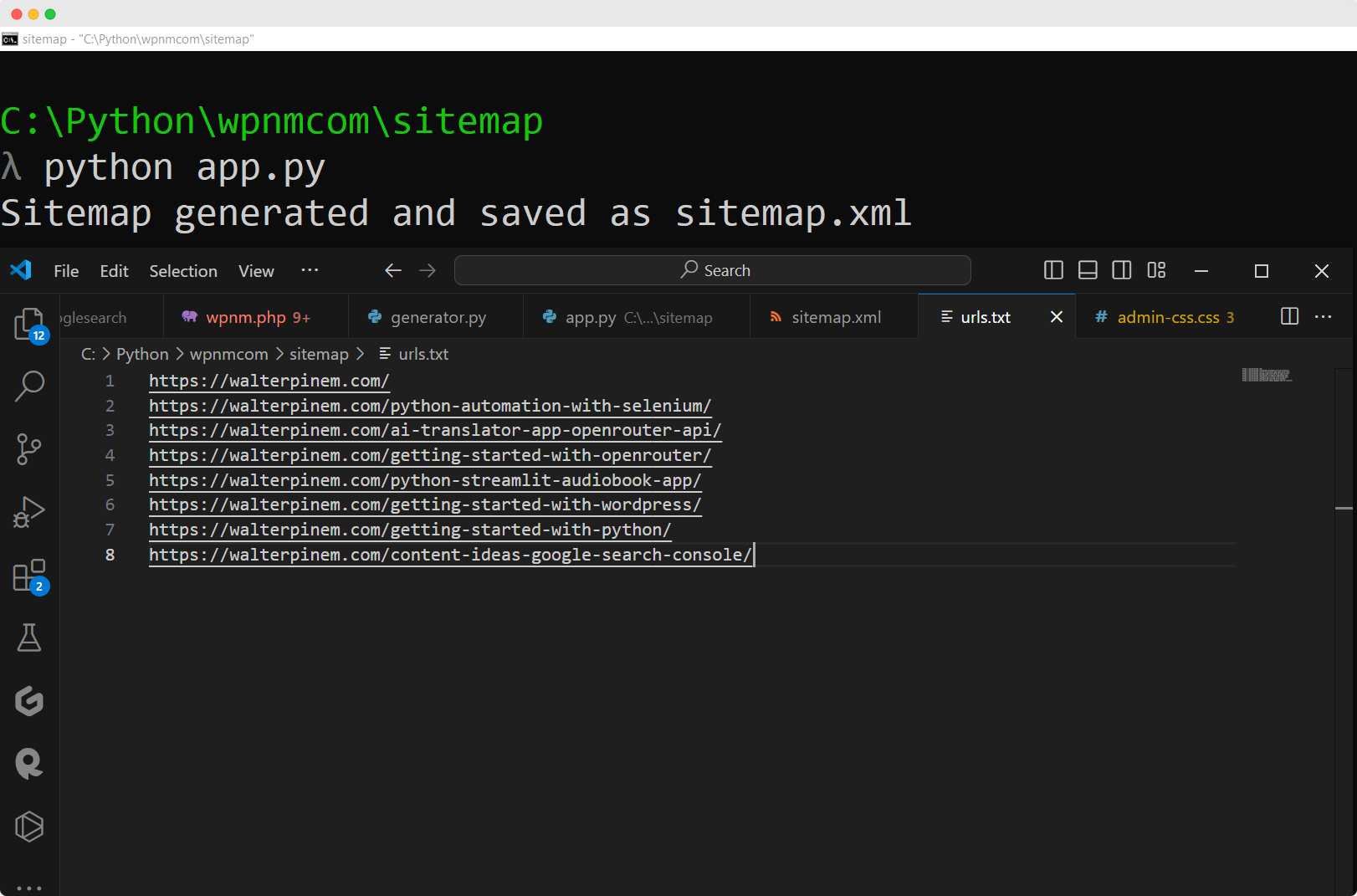
XML sitemaps improve website SEO and make it easier for search engines to navigate your site. They function as a guide for platforms like Google, allowing them to find and catalog your website’s pages more effectively.
Using Python, you can build and update XML sitemaps, which enhances your site’s appearance in search results. This simplifies how search engines scan your content and provides you with a clear understanding of your site’s organization, supporting better decisions about creating and refining content.
import datetime

def generate_sitemap(urls):
    today_date = datetime.datetime.now().strftime('%Y-%m-%dT%H:%M:%S+00:00')
    sitemap = '''<?xml version="1.0" encoding="UTF-8"?>
<urlset xmlns="http://www.sitemaps.org/schemas/sitemap/0.9">'''

    for url in urls:
        sitemap += f'''
<url>
<loc>{url}</loc>
<lastmod>{today_date}</lastmod>
</url>'''

    sitemap += '''
</urlset>'''

    return sitemap

def main():
    with open('urls.txt', 'r', encoding='utf-8') as file:
        urls = [line.strip() for line in file if line.strip()]

    sitemap = generate_sitemap(urls)
    with open('sitemap.xml', 'w', encoding='utf-8') as file:
        file.write(sitemap)

    print("Sitemap generated and saved as sitemap.xml")

if __name__ == "__main__":
    main()
For full walkthrough and in-depth explanation for part by part of the Python script, read my Create an XML Sitemap With Python blog post. If you want to test how it works first, I also created a web online version of the XML Sitemap Generator.
Create an XML Sitemap With Python (With Sample Code)
Summarize with: ChatGPT Grok Perplexity Claude How to Create an XML Sitemap for SEO With Python ... Read More
Project #20: AI-Driven SEO Content Brief Tool
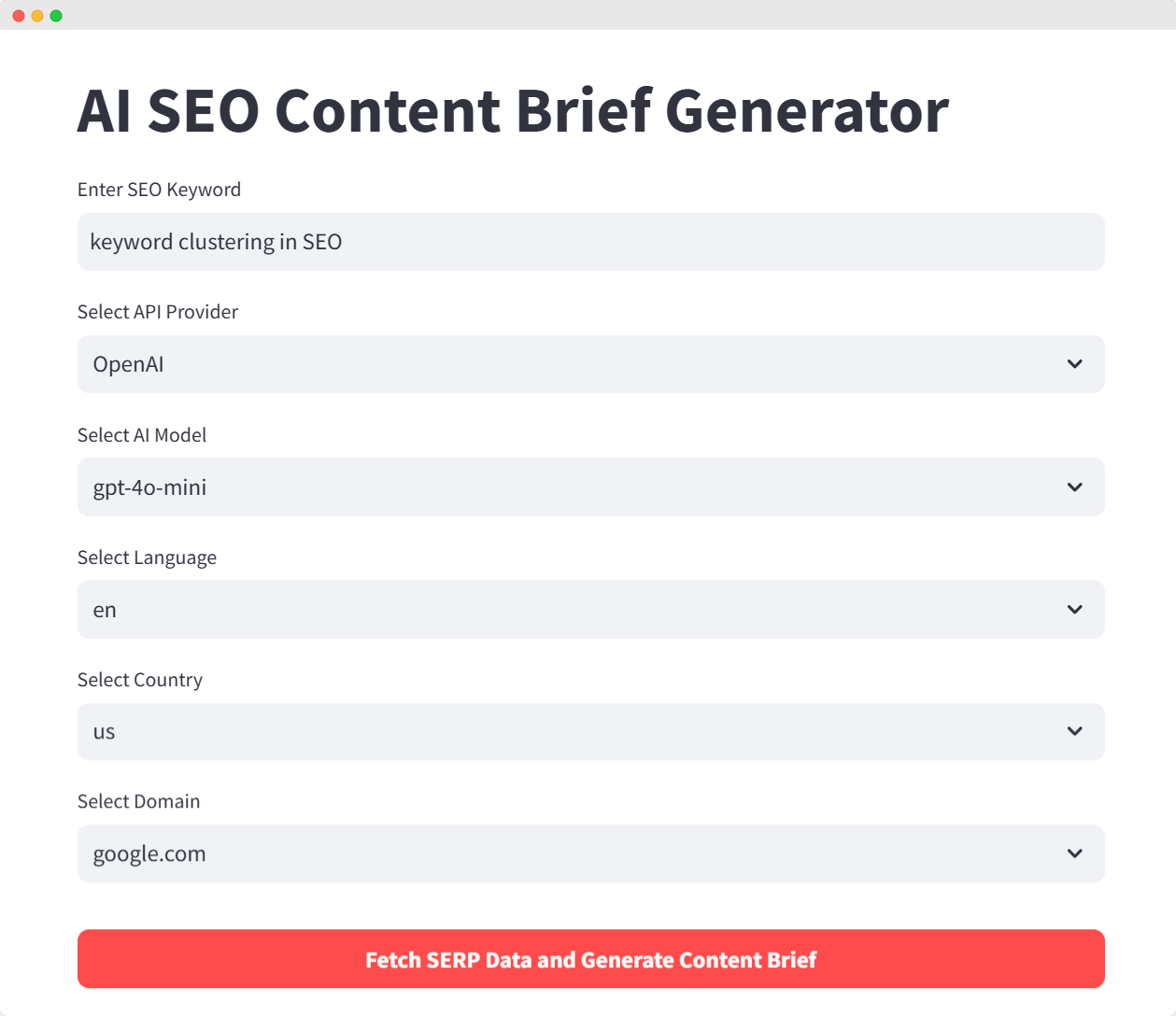
With this Python project, you can create your own AI-Driven SEO Content Brief Tool, use AI to automate SEO content briefs through OpenAI, Groq, SerpApi, and Streamlit.
# pip install streamlit openai groq requests seo-keyword-research-tool python-dotenv pandas

import os
from dotenv import load_dotenv
import json
import streamlit as st
from collections import Counter
from SeoKeywordResearch import SeoKeywordResearch
from openai import OpenAI
from groq import Groq
import pandas as pd

# Load environment variables from .env file
load_dotenv()

# Define the API keys
openai_api_key = os.getenv("OPENAI_API_KEY")
groq_api_key = os.getenv("GROQ_API_KEY")
openrouter_api_key = os.getenv("OPENROUTER_API_KEY")
serp_api_key = os.getenv("SERPAPI_API_KEY")

# Helper function to initialize the selected AI client
def initialize_client(api, model_selection, api_key):
    if api == "OpenAI":
        return OpenAI(api_key=openai_api_key)
    elif api == "Groq":
        return Groq(api_key=groq_api_key)
    else:  # For OpenRouter
        return OpenAI(
            base_url="https://openrouter.ai/api/v1",
            api_key=openrouter_api_key
        )

# Function to fetch SERP data dynamically
def fetch_serp_data(query, api_key, lang='en', country='us', domain='google.com'):
    keyword_research = SeoKeywordResearch(
        query=query,
        api_key=api_key,
        lang=lang,
        country=country,
        domain=domain
    )

    auto_complete_results = keyword_research.get_auto_complete()
    related_searches_results = keyword_research.get_related_searches()
    related_questions_results = keyword_research.get_related_questions()

    data = {
        'auto_complete': auto_complete_results,
        'related_searches': related_searches_results,
        'related_questions': related_questions_results
    }

    return data

# Function to generate content brief
def generate_content_brief(query, serp_data, client, model_selection):
    auto_complete = serp_data['auto_complete']
    related_searches = serp_data['related_searches']
    related_questions = serp_data['related_questions']

    all_keywords = auto_complete + related_searches + related_questions

    stop_words = set(['the', 'a', 'an', 'in', 'on', 'at', 'for', 'to', 'of', 'and', 'is', 'are'])
    word_count = Counter(word.lower() for phrase in all_keywords for word in phrase.split() if word.lower() not in stop_words)
    top_keywords = [word for word, count in word_count.most_common(5)]

    prompt = f"""
    Create a content brief for an article about {query}. Use the following information:

    Top keywords: {', '.join(top_keywords)}

    Key questions to address:
    {' '.join(related_questions)}

    Related topics:
    {' '.join(related_searches)}

    The content brief should include:
    1. Suggested title
    2. Target keyword
    3. Article outline: Generate a comprehensive outline for the blog post/article.
    4. Key points to cover in each section
    5. Suggested word count
    6. Meta description
    """

    response = client.chat.completions.create(
        model=model_selection,
        messages=[
            {"role": "system", "content": "You are a helpful SEO content strategist."},
            {"role": "user", "content": prompt}
        ]
    )

    return response.choices[0].message.content

# Function to convert JSON data to a Pandas DataFrame for tabular display
def json_to_dataframe(serp_data):
    auto_complete_df = pd.DataFrame(serp_data['auto_complete'], columns=['Auto Complete'])
    related_searches_df = pd.DataFrame(serp_data['related_searches'], columns=['Related Searches'])
    related_questions_df = pd.DataFrame(serp_data['related_questions'], columns=['Related Questions'])

    # Combine into a single dataframe with three columns
    combined_df = pd.concat([auto_complete_df, related_searches_df, related_questions_df], axis=1)
    return combined_df

# Streamlit interface
def main():
    st.title("AI SEO Content Brief Generator")

    # Inputs
    query = st.text_input("Enter SEO Keyword", "keyword clustering in SEO", placeholder="e.g. keyword clustering in SEO")
    model_options = {
        "OpenAI": ["gpt-4o", "gpt-4o-mini", "o1-preview", "o1-mini"],
        "Groq": ["llama-3.1-70b-versatile", "llama-3.1-8b-instant"],
        "OpenRouter": ["nousresearch/hermes-3-llama-3.1-405b:free", "google/gemma-2-9b-it:free", "mistralai/mistral-7b-instruct:free"]
    }
    selected_api = st.selectbox("Select API Provider", ["OpenAI", "Groq", "OpenRouter"])
    model_selection = st.selectbox("Select AI Model", model_options[selected_api])

    lang = st.selectbox("Select Language", ['en','id', 'es', 'fr', 'de', 'it'])
    country = st.selectbox("Select Country", ['us','id', 'uk', 'de', 'fr', 'es'])
    domain = st.selectbox("Select Domain", ['google.com', 'google.co.id', 'google.co.in', 'google.co.uk', 'google.de', 'google.es', 'google.fr'])

    # Generate SERP data
    st.markdown(
    """
    <style>
    button {
        width:100%!important;
    }
    button p {
        font-weight: bold!important;
    }
    </style>
    """,
    unsafe_allow_html=True,
    )
    if st.button( "Fetch SERP Data and Generate Content Brief", type="primary"):
        serp_data = fetch_serp_data(query, serp_api_key, lang=lang, country=country, domain=domain)

        # Initialize AI client based on selection
        client = initialize_client(selected_api, model_selection, os.getenv(f"{selected_api.upper()}_API_KEY"))

        content_brief = generate_content_brief(query, serp_data, client, model_selection)

        # Display the content brief in markdown
        st.subheader("Generated SEO Content Brief", divider="gray")
        st.markdown(content_brief)

        # Convert JSON to table format using pandas
        serp_df = json_to_dataframe(serp_data)
        st.subheader("SERP Keyword Data", divider="gray")
        st.table(serp_df)

        # Save SERP data as JSON and show it in the plain text area
        serp_json = json.dumps(serp_data, indent=2)
        st.text_area("Scraped SERP Data (JSON)", serp_json)

        # Save to a file
        with open(f"{query.replace(' ', '_')}.json", 'w') as f:
            json.dump(serp_data, f, indent=2)

        st.success(f"SERP data saved to {query.replace(' ', '_')}.json")

if __name__ == "__main__":
    main()
For more in-depth walkthrough of part by part code explanation, read my previously written Create an AI-Driven SEO Content Brief Tool Using SerpApi, OpenAI, Groq, and OpenRouter blog post.
Create an AI-Driven SEO Content Brief Tool Using SerpApi, OpenAI, Groq, and OpenRouter
Summarize with: ChatGPT Grok Perplexity Claude Building an AI-Powered SEO Content Brief Tool Using ... Read More
Project #21: Python Bulk Canonical URLs Checker

If you have clients and instead of manually running canonical URLs audit, you can use Python to automate it for you. You can auild a Python canonical URL checker that audits www vs non-www, HTTP to HTTPS redirects, redirect chains, and canonical tags with confidence scoring.
def fetch(url: str, timeout: int, session: requests.Session):
    try:
        resp = session.get(url, timeout=timeout, headers=HEADERS, allow_redirects=True)
        chain = [r.url for r in resp.history] + [resp.url]

        parser = CanonicalParser()
        parser.feed(resp.text[:50_000])

        return resp.url, resp.status_code, chain, parser.canonical, None

    except requests.exceptions.SSLError as e:
        return None, None, [], None, f"SSL error: {e}"
    except requests.exceptions.ConnectionError as e:
        return None, None, [], None, f"Connection error: {e}"
    except requests.exceptions.Timeout:
        return None, None, [], None, "Timeout"
    except Exception as e:
        return None, None, [], None, str(e)
Read my blog post titled How to Check Canonical URLs in Bulk Using Python for more in-depth walkthrough.
How to Check Canonical URLs in Bulk Using Python
Summarize with: ChatGPT Grok Perplexity Claude Build a Canonical URL Checker in Python to Audit Any ... Read More
Project #22: Bulk Domain Age Checker

If you’re that kind of SEO guy who wants to take advantage of the power of expired/aged domains rather than building a fresh domain from scratch, and if you have a bunch of list of expired domains to check, you can build a simple Python script to check their ages in bulk.
from fastapi import FastAPI, HTTPException, Query
import whois
from datetime import datetime
from dateutil.relativedelta import relativedelta
import re

app = FastAPI()

@app.get("/domain/age")
def get_domain_age(domain: str = Query(
    ...,
    regex=r"^(?:[a-zA-Z0-9-]+\.)+[a-zA-Z]{2,}$",
    description="The domain name to check (e.g., 'example.com')"
)):
    """
    Get WHOIS information and the age of a domain.

    - **domain**: The domain name to check.
    """
    try:
        # Retrieve WHOIS information for the domain
        domain_info = whois.whois(domain)

        # Extract relevant WHOIS fields
        creation_date = domain_info.creation_date
        updated_date = domain_info.updated_date
        expiration_date = domain_info.expiration_date
        registrar = domain_info.registrar
        name_servers = domain_info.name_servers
        status = domain_info.status

        # Handle cases where dates might be lists
        if isinstance(creation_date, list):
            creation_date = creation_date[0]
        if isinstance(updated_date, list):
            updated_date = updated_date[0]
        if isinstance(expiration_date, list):
            expiration_date = expiration_date[0]

        # Check if creation_date was found
        if creation_date is None:
            raise ValueError("Creation date not found for this domain.")

        # Calculate the age of the domain
        now = datetime.now()
        age_delta = relativedelta(now, creation_date)
        age_in_days = (now - creation_date).days
        age_in_weeks = age_in_days // 7
        age_in_months = age_delta.years * 12 + age_delta.months
        age_in_years = age_delta.years

        # Format dates as strings
        creation_date_str = creation_date.strftime('%Y-%m-%d') if creation_date else None
        updated_date_str = updated_date.strftime('%Y-%m-%d') if updated_date else None
        expiration_date_str = expiration_date.strftime('%Y-%m-%d') if expiration_date else None

        # Ensure name_servers and status are lists
        name_servers_list = list(name_servers) if name_servers else None
        status_list = list(status) if status else None

        # Build the response dictionary
        response = {
            "domain": domain,
            "age": {
                "age_in_days": age_in_days,
                "age_in_weeks": age_in_weeks,
                "age_in_months": age_in_months,
                "age_in_years": age_in_years
            },
            "registrar": registrar,
            "creation_date": creation_date_str,
            "updated_date": updated_date_str,
            "expiration_date": expiration_date_str,
            "name_servers": name_servers_list,
            "status": status_list
        }

        return response

    except Exception as e:
        # Raise an HTTPException with a 400 status code and the error message
        raise HTTPException(status_code=400, detail=str(e))
For more detailed guide, refer to my Build a Domain Age Checker API with FastAPI and Python blog post. If you want to test how it works first, check out my browser version of Bulk Domain Age Checker. Other similar browser tools you can test: WHOIS Lookup, IP Lookup, DNS Lookup, Domain Availability Checker, Domain Age Checker, and Bulk Domain Availability Checker.
Build a Domain Age Checker API with FastAPI and Python
Summarize with: ChatGPT Grok Perplexity Claude FastAPI Mastery: Creating a Domain Age Checker API ... Read More
Other Python Projects You Can Try to Exercise Python
Now that you have a bunch of real project ideas to start learning Python as a beginner, why not try the following projects also while you’re at it?
Project #23: OpenAI’s GPT-5+ API Testing Using Python
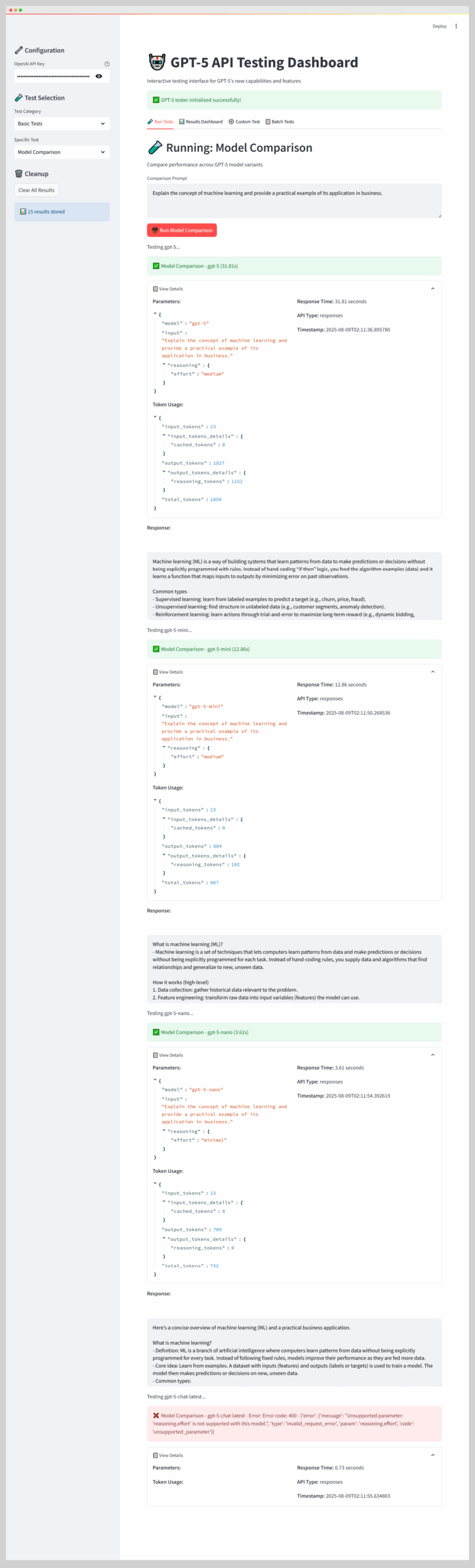
This guide explains how to create a Streamlit dashboard for testing OpenAI’s GPT-5 API. It offers developers a framework to evaluate GPT-5+ model variants (gpt-5, gpt-5.2-mini, gpt-5.4-nano, gpt-5.4) and features like reasoning efforts, verbosity, and tool integration.
GPT-5 API Testing: Building GPT-5 API Testing Dashboard with Streamlit
Summarize with: ChatGPT Grok Perplexity Claude Building a Comprehensive GPT-5 Testing Dashboard: ... Read More
Project #24: Testing xAI Grok 4+ API With Python

Learn how to test Grok 4 through the xAI API using Python. This step-by-step guide covers setup procedures, making API calls, using DeepSearch, executing code, and applying troubleshooting techniques.
Grok 4: Testing Grok 4 via xAI API: Code Interpreter, Tools, and Python Examples
Summarize with: ChatGPT Grok Perplexity Claude Grok 4 Code Interpreter and xAI API: A Python ... Read More
Project #25: Testing Gemini AI Models with Streamlit
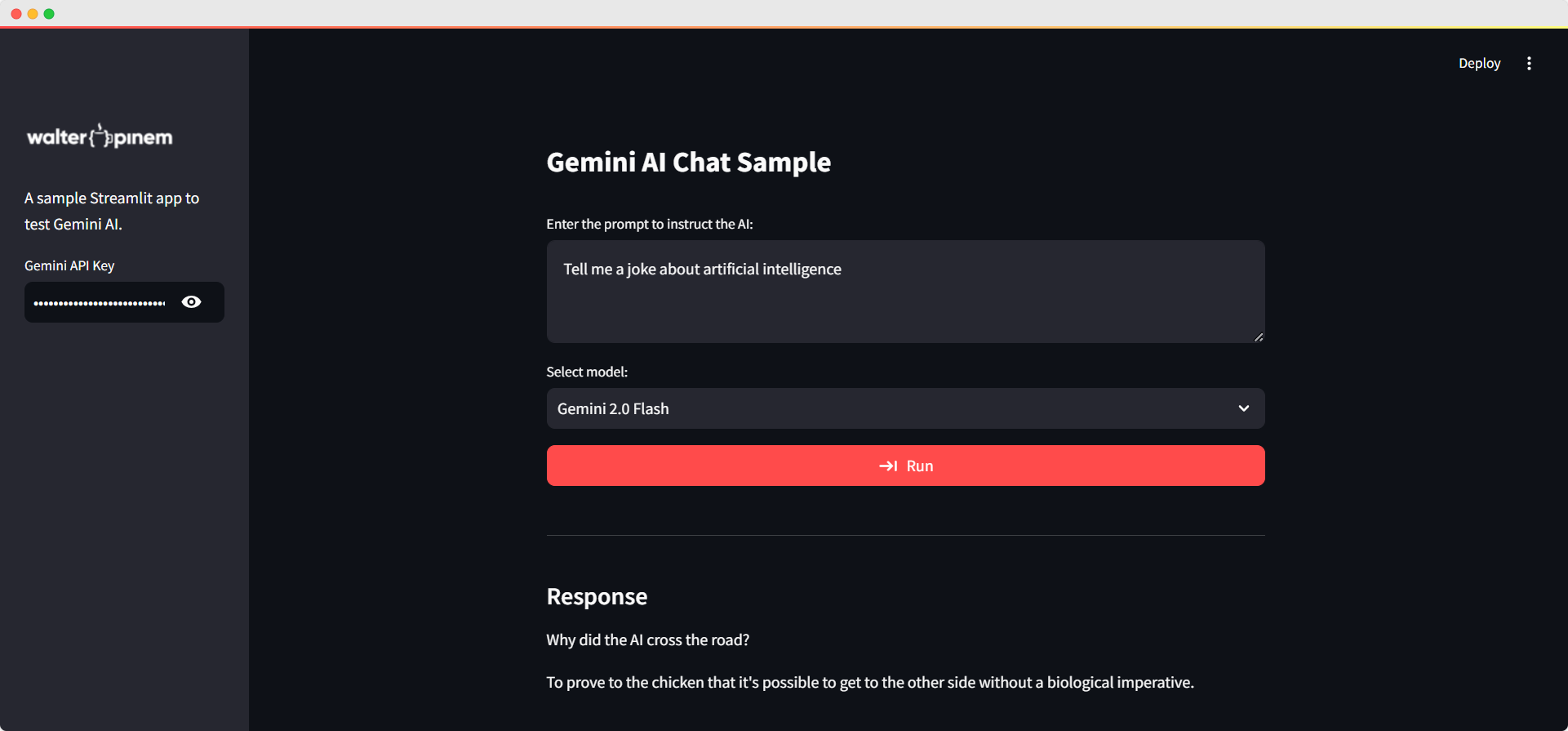
In this Python project, I’ll show you how I built a Python Streamlit app for playing around with the Gemini AI API! I’ll show you the ropes, from setting up the interface to getting the API working and adding some cool interactive features to make everything flow nicely. So, let’s jump right in and see how you can use Gemini AI and integrate it in your own projects!
Gemini AI API: Testing Gemini AI Models with Streamlit
Summarize with: ChatGPT Grok Perplexity Claude Gemini is Google’s most capable and general AI ... Read More
Project #26: Create an AI Translator App with OpenRouter API, Python, and Streamlit
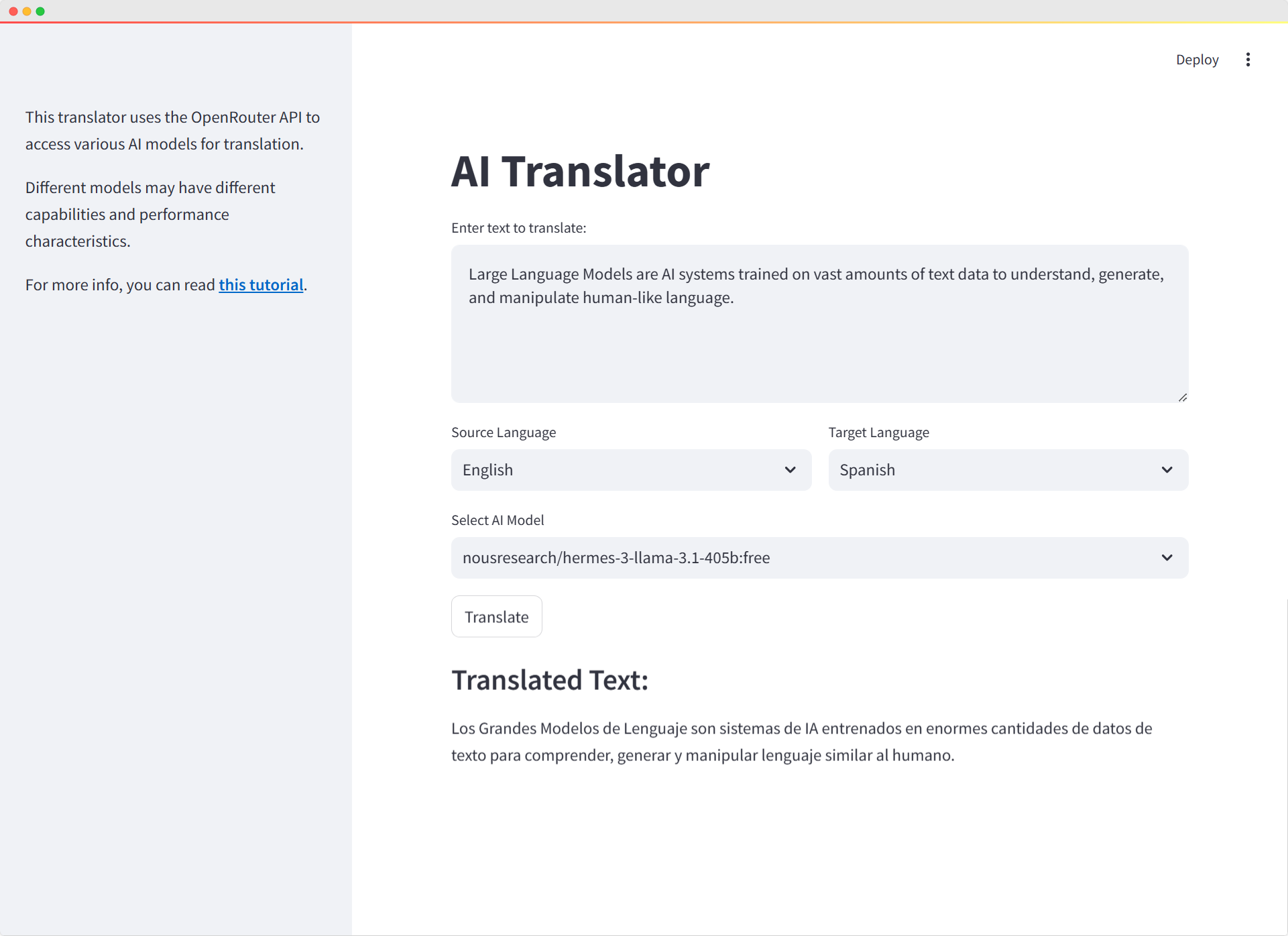
Build a sophisticated AI-powered Translator web application utilizing the OpenRouter API and freely available AI models, integrated with Python and Streamlit frameworks. This allows for rapid and effortless development.
Create an AI Translator App with OpenRouter API, Python, and Streamlit
Summarize with: ChatGPT Grok Perplexity Claude How to Create a Simple AI Translator App with ... Read More
Project #27: Create an Audiobook App Using Python and Streamlit
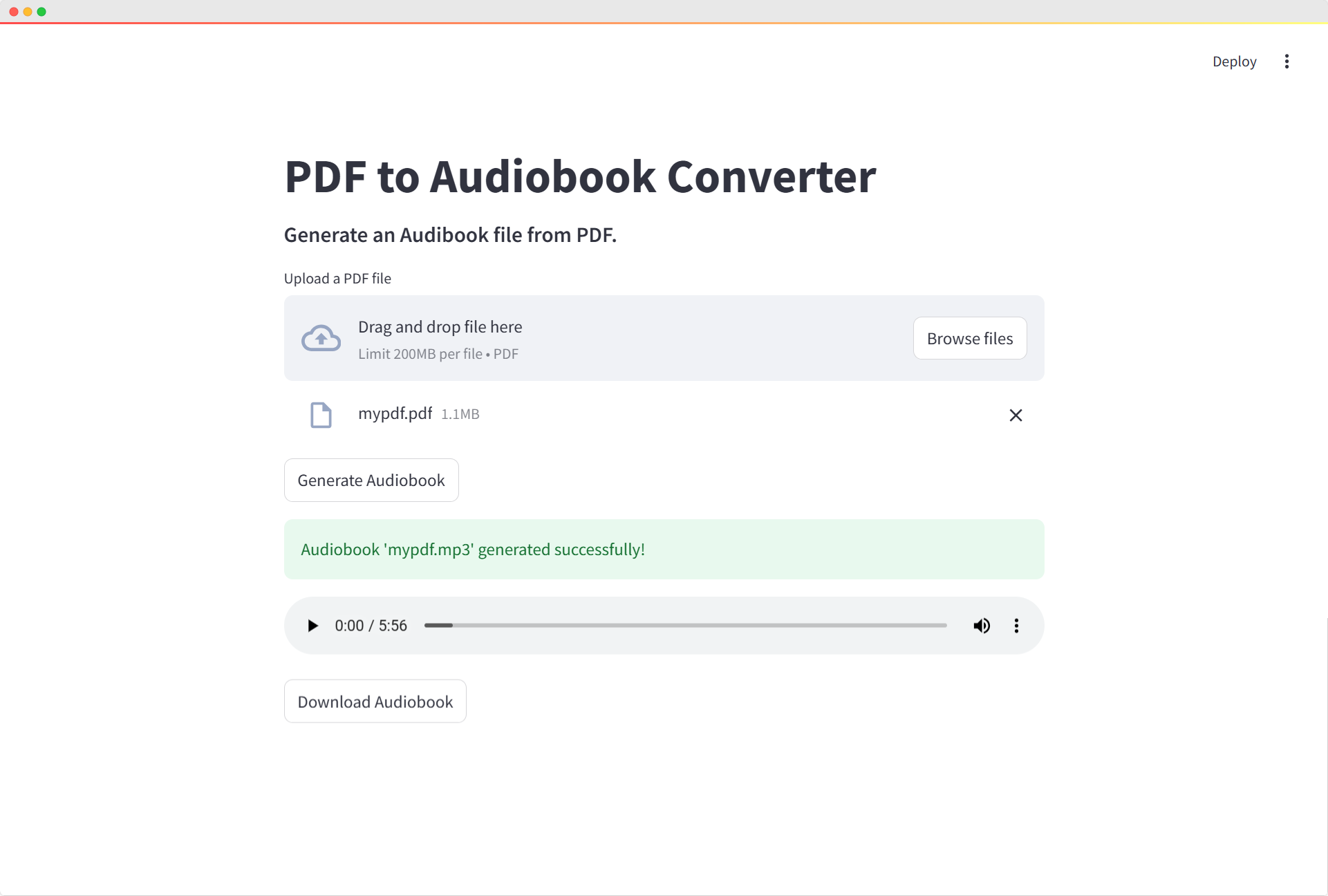
Building this audiobook converter app was a great way to combine my love for Python programming with practical web development. Using pdfplumber to extract text, pyttsx3 to handle text-to-speech conversion, and Streamlit to create an intuitive web interface, I was able to build a fully functional tool that anyone can use.
How to Create an Audiobook App Using Python and Streamlit
Summarize with: ChatGPT Grok Perplexity Claude How to Create an Audiobook App Using Python and ... Read More
Where to Practice When You Are Ready for More
Working through these exercises builds your foundation. But you need volume to get fast, and variety to get flexible.
- Pynative has over 400 exercises organized by topic, with hints and solutions when you genuinely get stuck. The difficulty progression is logical rather than sadistic.
- Exercism offers 146 Python exercises with optional community mentorship. Real developers review your code and suggest improvements. That feedback loop is hard to replicate on your own.
- W3Resource hosts nearly 9,500 problems across every Python topic. You will not run out of challenges.
- Real Python publishes full project tutorials with complete source code and detailed explanations. These are multi-hour builds that teach professional workflows, not bite-sized snippets.
The method that actually works: read the problem, close the solution, write the code yourself. When you get stuck, struggle for at least ten minutes before checking the answer. The struggle is where learning happens. Copying solutions feels productive but teaches you nothing. It is the cognitive equivalent of watching someone else work out and wondering why you are not getting stronger.
Write code that breaks. Fix it. Break it again differently. That loop, repeated a few hundred times, is what turns a beginner into someone who can actually build things.
For a broader foundation, the Getting Started With Python Programming guide is worth revisiting after you have worked through these exercises. Concepts that seemed abstract the first time will suddenly make perfect sense.
Frequently Asked Questions (FAQs)
How long should I spend on each exercise before checking a solution?
At least ten minutes of genuine attempt. If you have tried multiple approaches and are truly stuck, look at the solution, understand it line by line, close it, and write it again from memory. Reading a solution once and moving on is the same as not doing the exercise at all.
Do I need to set up a virtual environment for these exercises?
For standalone scripts like these, it is optional but recommended as a habit. The Python virtual environment guide covers the full setup in a few minutes. Getting used to working in isolated environments now saves a lot of dependency headaches later.