



Building a Comprehensive GPT-5 Testing Dashboard: Complete Code Walkthrough – OpenAI’s GPT-5 represents a massive leap forward in AI capabilities, particularly for developers and engineers.
Released on August 7, 2025, this unified system combines exceptional coding abilities with advanced reasoning and multimodal understanding.
The model family includes variants like gpt-5, gpt-5-mini, gpt-5-nano, and gpt-5-chat, each optimized for different use cases and pricing tiers.
What makes GPT-5 special isn’t just its performance—it’s the new API features that give developers unprecedented control.
You get verbosity parameters to control response length, reasoning effort settings to balance speed versus depth, and custom tools that accept raw text payloads without JSON wrapping.
The pricing is aggressively competitive at $1.25 per million input tokens for the flagship model, making it accessible for widespread adoption.
To help developers explore these capabilities, I’ve built a comprehensive Streamlit testing dashboard that puts every GPT-5 feature through its paces.
TL;DR
Hide- Comprehensive GPT-5 Model Testing Platform: The Streamlit dashboard provides complete testing coverage for all GPT-5 variants (gpt-5, gpt-5-mini, gpt-5-nano, gpt-5-chat) with systematic evaluation of new API features like reasoning effort controls, verbosity parameters, and custom tool integration. The platform enables side-by-side model comparisons and performance benchmarking across different use cases.
- Advanced API Integration with Robust Response Handling: The implementation showcases sophisticated integration with GPT-5's new Responses API, featuring multi-layered response parsing that handles complex structured outputs with fallback compatibility. Real-time progress tracking, comprehensive error handling, and retry mechanisms ensure reliable operation even during API evolution or network issues.
- Production-Ready Architecture with Enterprise Features: The modular codebase includes enterprise-grade features like session management, security controls, rate limiting, and comprehensive logging. Integration capabilities with monitoring systems, CI/CD pipelines, version control, and MLOps platforms make it suitable for production deployment and team collaboration.
- Intelligent Testing Automation and Optimization: The dashboard includes sophisticated batch testing capabilities, automated parameter optimization based on model characteristics, and systematic testing frameworks that adapt reasoning effort and verbosity settings for optimal performance. Stress testing and A/B testing capabilities enable comprehensive performance validation.
- Advanced Analytics and Data Visualization: Interactive Plotly visualizations provide deep insights into model performance patterns, including response time distributions, token efficiency analysis, and multi-dimensional performance comparisons. Export capabilities (JSON, CSV, Excel, PDF) enable integration with external analysis tools and long-term performance tracking.
- Extensible Framework for Future Development: The plugin-like architecture supports easy addition of new test types, model variants, and integration capabilities as GPT-5 evolves. Custom testing frameworks, performance benchmarking suites, and integration templates provide foundations for specialized applications and community contributions.
- Real-World Impact on AI Development Workflows: The dashboard accelerates AI application development by providing concrete performance data, cost optimization insights, and quality assurance validation. Systematic testing capabilities enable evidence-based decisions about model selection, parameter configuration, and deployment strategies, ultimately reducing time-to-production and operational costs.
This app lets you easily try out different model versions, check out how they stack up with various performance numbers, and get a feel for how the updated API settings actually work when you use them.
Let’s check out how it all comes together.
Prerequisites
Before diving into the GPT-5 Streamlit testing dashboard implementation, you’ll need to ensure your development environment meets certain requirements and that you have the necessary access credentials and technical knowledge.
Technical Requirements
Python Environment: You’ll need Python 3.8 or higher installed on your system. The application leverages several modern Python features and libraries that require recent Python versions. We recommend using Python 3.9 or 3.10 for optimal compatibility with all dependencies.
Package Management: A virtual environment manager like venv, conda, or poetry is strongly recommended to isolate project dependencies. This prevents conflicts with other Python projects and ensures consistent behavior across different development environments.
System Resources: The dashboard performs multiple concurrent API calls and processes real-time data visualization. Ensure your system has at least 4GB of available RAM and a stable internet connection for reliable operation.
Required Python Packages
Install the following packages using pip or your preferred package manager:
pip install openai requests python-dotenv streamlit plotly pandas
Streamlit Version: The application uses advanced Streamlit features like session state management, progress bars, and custom CSS injection. Ensure you have Streamlit 1.28.0 or later for full compatibility.
- OpenAI GPT-4.1: Build a Streamlit App to Test OpenAI’s GPT-4.1 Models
- Grok xAI: Testing Grok xAI API with Streamlit
- Gemini AI API: Testing Gemini AI Models with Streamlit
- Create an AI-Driven SEO Content Brief Tool Using SerpApi, OpenAI, Groq, and OpenRouter
- Create an AI Translator App with OpenRouter API, Python, and Streamlit
- Getting Started with OpenRouter
- How to Create an Audiobook App Using Python and Streamlit
OpenAI Client: The latest OpenAI Python client (v1.0.0+) is required to access the GPT-5 Responses API. Older versions of the OpenAI library use different API structures and won’t work with this implementation.
API Access and Credentials
OpenAI API Key: You’ll need a valid OpenAI API key with access to GPT-5 models. As of the GPT-5 release, this requires a paid OpenAI account with appropriate billing limits configured. Free tier accounts may not have access to all GPT-5 variants.
API Rate Limits: Familiarize yourself with OpenAI’s rate limiting policies for your account tier. The testing dashboard can generate multiple API calls in quick succession, especially during batch testing or model comparison scenarios.
Billing Awareness: GPT-5 API calls consume tokens that are billed according to OpenAI’s pricing structure. The dashboard tracks token usage, but you should monitor your API costs, especially when running comprehensive test suites.
Development Environment Setup
Code Editor: While any text editor works, VS Code with the Python extension provides excellent debugging capabilities and integrated terminal access that streamlines development and testing.
Git (Optional but Recommended): Version control helps track changes to your testing configurations and results. The dashboard includes features for exporting test results that integrate well with Git workflows.
Command Line Access: Basic familiarity with command line operations helps with package installation, environment management, and running the Streamlit application.
Background Knowledge
Streamlit Fundamentals: Understanding Streamlit’s reactive programming model, session state management, and component lifecycle will help you modify and extend the dashboard effectively. You don’t need expert-level knowledge, but basic familiarity with Streamlit concepts is beneficial.
REST API Concepts: The dashboard interacts with OpenAI’s REST API, so understanding HTTP requests, response handling, and error codes will help you troubleshoot issues and understand the underlying mechanics.
Data Analysis Basics: The dashboard generates comprehensive analytics and visualizations. Basic familiarity with pandas DataFrames, statistical concepts like percentiles and distributions, and data visualization principles will help you interpret results effectively.
GPT-5 Model Understanding: While not strictly required, understanding GPT-5’s capabilities, model variants (gpt-5, gpt-5-mini, gpt-5-nano, gpt-5-chat), and new features like reasoning effort and verbosity controls will help you design more effective tests.
Optional but Helpful
Docker (Optional): For production deployment or consistent environment management, Docker can containerize the application with all dependencies. This isn’t required for local development but becomes valuable for team collaboration or deployment scenarios.
Cloud Platform Account: If you plan to deploy the dashboard for team use, familiarity with cloud platforms like AWS, Google Cloud, or Azure will help with hosting Streamlit applications publicly.
Database Knowledge: While the basic implementation uses session state for data storage, understanding database concepts helps if you want to add persistent storage for test results or user management features.
Environment Variable Setup
Create a .env file in your project directory to store sensitive configuration:
OPENAI_API_KEY=your_openai_api_key_here
ENVIRONMENT=development
LOG_LEVEL=INFO
MAX_CONCURRENT_TESTS=3
RESULTS_RETENTION_DAYS=7
This approach keeps sensitive information out of your source code while providing flexible configuration options for different deployment environments.
With these prerequisites in place, you’ll be ready to implement and run the comprehensive GPT-5 testing dashboard successfully.
What We’re Gonna Build
In this blog post, we’re gonna build a simple GPT-5 Streamlit dashboard to testing the API connection, capabilities, and comparison for each model. Take a look at the following screenshot:
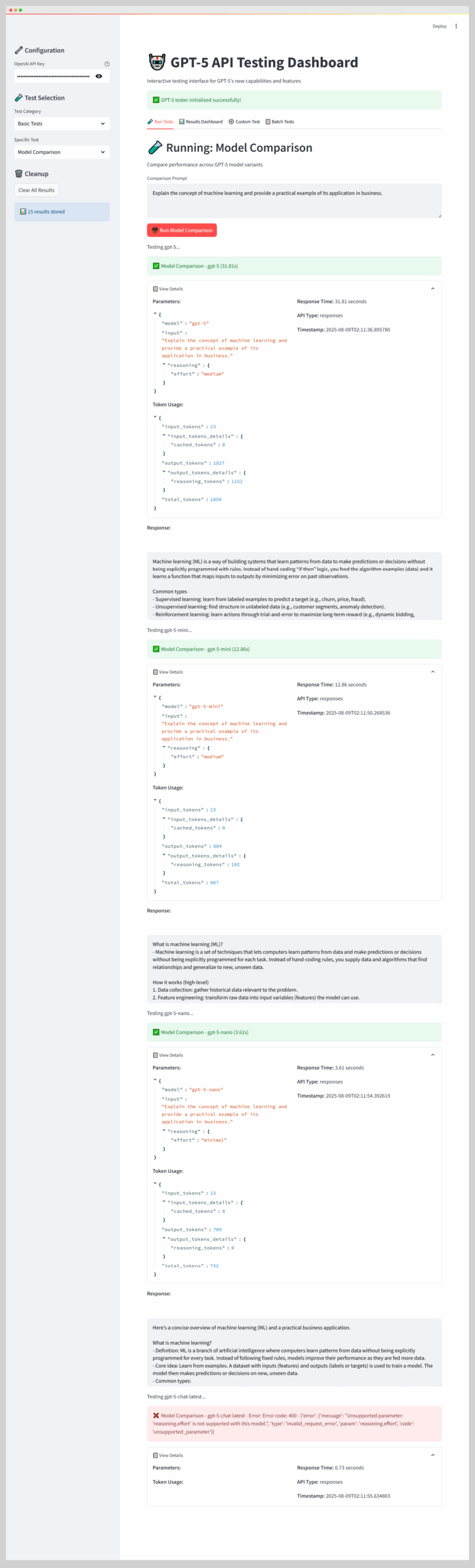
There’s more aspect of the GPT-5 we can test with this simple Streamlit dashboard.
Application Setup and Core Dependencies
The foundation of any robust Streamlit application starts with proper configuration and dependency management.
This GPT-5 testing dashboard requires several key components that work together to provide a seamless testing experience.
"""
GPT-5 Streamlit Testing Dashboard
Interactive web-based testing interface for GPT-5 API capabilities
"""

import streamlit as st
import os
import time
import json
import pandas as pd
from typing import Dict, List, Any, Optional
from dataclasses import dataclass, asdict
from datetime import datetime
import plotly.express as px
import plotly.graph_objects as go

# Set page config first - this must happen before any other Streamlit commands
st.set_page_config(
    page_title="GPT-5 API Tester",
    page_icon="🤖",
    layout="wide",
    initial_sidebar_state="expanded"
)
The page configuration happens first because Streamlit requires it before any other UI elements.
The wide layout gives us more screen real estate for displaying results and charts side by side.
The expanded sidebar ensures users see all configuration options immediately when they load the application.
Import Management and Error Handling
try:
    from openai import OpenAI
    import requests
    from dotenv import load_dotenv
except ImportError:
    st.error("Required packages not installed. Run: pip install openai requests python-dotenv streamlit plotly")
    st.stop()

# Load environment variables
load_dotenv()
This approach handles missing dependencies gracefully by showing clear installation instructions rather than cryptic import errors.
The st.stop() function prevents the application from continuing with missing dependencies, which would cause confusing errors later in the code.
Data Model Definition
@dataclass
class TestResult:
    test_name: str
    model: str
    api_type: str
    success: bool
    response_time: float
    token_usage: Dict[str, int]
    response_content: str
    error_message: Optional[str] = None
    parameters: Optional[Dict] = None
    timestamp: str = ""
The TestResult dataclass captures everything we need to analyze API performance and behavior. Using a dataclass provides type hints, automatic __init__ methods, and easy conversion to dictionaries for JSON export or pandas DataFrames for analysis.
GPT-5 Tester Core Implementation
The heart of our testing system lies in the GPT5StreamlitTester class, which handles all interactions with the OpenAI API and manages the complexities of GPT-5’s new response formats.
This class abstracts away the API complexity while providing detailed control over testing parameters.
class GPT5StreamlitTester:
    def __init__(self, api_key: str):
        """Initialize the GPT-5 Streamlit tester"""
        try:
            self.client = OpenAI(api_key=api_key)
        except Exception as e:
            st.error(f"Failed to create OpenAI client: {e}")
            raise

        # GPT-5 model variants - explicitly define these
        self.models = ['gpt-5', 'gpt-5-mini', 'gpt-5-nano', 'gpt-5-chat-latest']
        self.reasoning_efforts = ['minimal', 'low', 'medium', 'high']
        self.verbosity_levels = ['low', 'medium', 'high']

        # Verify attributes were set correctly
        if not hasattr(self, 'models') or len(self.models) != 4:
            raise AttributeError(f"Models not properly initialized. Got: {getattr(self, 'models', 'None')}")
The initialization includes validation to ensure all required attributes get set correctly. This defensive programming catches configuration errors early rather than letting them cause mysterious failures during testing.
Advanced Response Content Extraction
One of the trickiest aspects of working with GPT-5’s new Responses API is extracting the actual response content from the structured response format.
The API returns complex nested objects rather than simple text strings.
def extract_response_content(self, response) -> str:
    """Extract content from response with comprehensive fallback methods"""
    content = ""

    # Method 1: GPT-5 Responses API structure (based on actual response format)
    if hasattr(response, 'output') and response.output:
        for output_item in response.output:
            if hasattr(output_item, 'type') and output_item.type == 'message':
                if hasattr(output_item, 'content') and output_item.content:
                    for content_item in output_item.content:
                        if hasattr(content_item, 'type') and content_item.type == 'output_text':
                            if hasattr(content_item, 'text'):
                                content = content_item.text
                                break
                    if content:
                        break

    # Method 2: Direct output.content access (fallback)
    if not content and hasattr(response, 'output') and response.output:
        if hasattr(response.output, 'content'):
            content = response.output.content
        elif hasattr(response.output, 'text'):
            content = response.output.text
        elif isinstance(response.output, str):
            content = response.output

    # Method 3: Choices format (Chat Completions style fallback)
    if not content and hasattr(response, 'choices') and response.choices:
        choice = response.choices
        if hasattr(choice, 'message') and hasattr(choice.message, 'content'):
            content = choice.message.content
        elif hasattr(choice, 'text'):
            content = choice.text

    # Method 4: Direct content/text attributes
    if not content:
        if hasattr(response, 'content'):
            content = response.content
        elif hasattr(response, 'text'):
            content = response.text

    # Method 5: Check for message content in different structures
    if not content and hasattr(response, 'message'):
        if hasattr(response.message, 'content'):
            content = response.message.content
        elif hasattr(response.message, 'text'):
            content = response.message.text

    return content or ""
This multi-layered approach handles different response formats as the API evolves.
Each method tries a different way to extract content, ensuring we get results even if the response structure changes.
The fallback methods provide compatibility with older API formats during transitions.
Safe Text Extraction Helper
def _safe_text_extract(self, content) -> str:
    """Safely extract text from content that might be an object or string"""
    if isinstance(content, str):
        return content
    elif hasattr(content, 'text'):
        return content.text
    elif hasattr(content, 'content'):
        return content.content
    else:
        return str(content)
This helper function handles cases where response content might be wrapped in objects rather than being plain strings.
It’s a defensive programming technique that prevents type errors when processing responses.
API Call Implementation with Progress Tracking
The core API interaction method handles the complexity of the GPT-5 Responses API while providing real-time feedback to users.
This method constructs requests dynamically based on test parameters and tracks progress through each stage of the API call.
def make_responses_api_call(self, model: str, input_text: str, **kwargs) -> TestResult:
    """Make Responses API call with progress tracking"""
    test_name = kwargs.pop('test_name', 'Generic Test')

    progress_bar = st.progress(0)
    status_text = st.empty()

    status_text.text(f"🚀 Making API call to {model}...")
    progress_bar.progress(25)

    start_time = time.time()

    try:
        # Prepare request data
        request_data = {"model": model, "input": input_text}

        # Add reasoning parameters if specified
        if 'reasoning_effort' in kwargs:
            request_data["reasoning"] = {"effort": kwargs.pop('reasoning_effort')}

        # Add verbosity parameters if specified
        if 'verbosity' in kwargs:
            if "text" not in request_data:
                request_data["text"] = {}
            request_data["text"]["verbosity"] = kwargs.pop('verbosity')

        # Add max_tokens if specified in text parameters
        if 'text' in kwargs and 'max_tokens' in kwargs['text']:
            if "text" not in request_data:
                request_data["text"] = {}
            request_data["text"]["max_tokens"] = kwargs['text']['max_tokens']
            kwargs.pop('text')  # Remove from kwargs to avoid duplication

        # Add tools if specified
        if 'tools' in kwargs:
            request_data["tools"] = kwargs.pop('tools')

        # Add tool_choice if specified
        if 'tool_choice' in kwargs:
            request_data["tool_choice"] = kwargs.pop('tool_choice')

        # Add any remaining parameters
        request_data.update(kwargs)

        progress_bar.progress(50)
        status_text.text(f"⏳ Waiting for response from {model}...")

        response = self.client.responses.create(**request_data)
        response_time = time.time() - start_time

        progress_bar.progress(75)
        status_text.text("📝 Processing response...")

        # Extract content using comprehensive method
        content = self.extract_response_content(response)

        # Ensure content is a string, not an object
        if content and not isinstance(content, str):
            if hasattr(content, 'text'):
                content = content.text
            elif hasattr(content, 'content'):
                content = content.content
            else:
                content = str(content)

        # Debug: Print response structure if content is empty
        if not content:
            st.warning("⚠️ Response received but content extraction failed.")
            if hasattr(response, 'model_dump'):
                st.json(response.model_dump())
            else:
                st.write("Response object:", str(response)[:500] + "..." if len(str(response)) > 500 else str(response))

        progress_bar.progress(100)
        status_text.text("✅ Request completed successfully!")

        result = TestResult(
            test_name=test_name,
            model=model,
            api_type="responses",
            success=True,
            response_time=response_time,
            token_usage=response.usage.model_dump() if hasattr(response, 'usage') and response.usage else {},
            response_content=content,
            parameters=request_data,
            timestamp=datetime.now().isoformat()
        )

        time.sleep(0.5)  # Brief pause to see success message
        progress_bar.empty()
        status_text.empty()

        return result

    except Exception as e:
        response_time = time.time() - start_time
        progress_bar.progress(100)
        status_text.text(f"❌ Error: {str(e)}")

        result = TestResult(
            test_name=test_name,
            model=model,
            api_type="responses",
            success=False,
            response_time=response_time,
            token_usage={},
            response_content="",
            error_message=str(e),
            parameters=kwargs,
            timestamp=datetime.now().isoformat()
        )

        time.sleep(2)  # Show error message longer
        progress_bar.empty()
        status_text.empty()

        return result
The progress tracking provides visual feedback during potentially long API calls, especially when using high reasoning effort settings.
The dynamic request construction handles all the new GPT-5 parameters while maintaining compatibility with standard chat completions.
Result Display Implementation
def display_result(self, result: TestResult):
    """Display test result in a nice format"""
    if result.success:
        st.success(f"✅ {result.test_name} - {result.model} ({result.response_time:.2f}s)")
    else:
        st.error(f"❌ {result.test_name} - {result.model} - Error: {result.error_message}")

    # Create expandable section for details
    with st.expander("📋 View Details", expanded=False):
        col1, col2 = st.columns(2)

        with col1:
            st.write("**Parameters:**")
            if result.parameters:
                st.json(result.parameters)

            st.write("**Token Usage:**")
            if result.token_usage:
                st.json(result.token_usage)

        with col2:
            st.write(f"**Response Time:** {result.response_time:.2f} seconds")
            st.write(f"**API Type:** {result.api_type}")
            st.write(f"**Timestamp:** {result.timestamp}")

    if result.success and result.response_content:
        st.write("**Response:**")
        # Ensure response_content is a string for display
        display_content = result.response_content
        if not isinstance(display_content, str):
            if hasattr(display_content, 'text'):
                display_content = display_content.text
            elif hasattr(display_content, 'content'):
                display_content = display_content.content
            else:
                display_content = str(display_content)
        st.markdown("""
            <style>
            .stTextArea [data-baseweb=base-input] [disabled=""]{
                -webkit-text-fill-color: #000;
            }
            </style>
            """,unsafe_allow_html=True)
        st.text_area("", display_content, height=200, disabled=True, key=f"response_{id(result)}")
    elif result.success and not result.response_content:
        st.warning("⚠️ API call successful but no response content received. This might be a response parsing issue.")

        # Show raw response for debugging
        with st.expander("🔍 Debug: Raw Response Structure"):
            st.write("If you see this, please check the response parsing logic.")
            st.write("Token usage shows the API worked, but content extraction failed.")
The display system uses expandable sections to keep the interface clean while providing access to detailed information.
The CSS injection fixes Streamlit’s default disabled text area styling to ensure response content remains readable.
Main Application Structure and Navigation
The main application function orchestrates the entire user experience, from initial setup through test execution and results analysis.
The structure uses Streamlit’s tab system to organize different testing capabilities while maintaining a clean, intuitive interface.
def main():
    """Main Streamlit application"""

    # Initialize session state FIRST
    if 'test_results' not in st.session_state:
        st.session_state.test_results = []

    # Title and description
    st.title("🤖 GPT-5 API Testing Dashboard")
    st.markdown("Interactive testing interface for GPT-5's new capabilities and features")

    # Sidebar for configuration
    st.sidebar.header("🔧 Configuration")

    # API Key input
    api_key = st.sidebar.text_input(
        "OpenAI API Key",
        type="password",
        value=os.getenv('OPENAI_API_KEY', ''),
        help="Enter your OpenAI API key or set OPENAI_API_KEY environment variable"
    )

    # Initialize tester
    if not api_key:
        st.error("❌ Please enter your OpenAI API key in the sidebar")
        st.info("💡 You can also set the OPENAI_API_KEY environment variable")
        st.stop()

    try:
        with st.spinner("Initializing GPT-5 tester..."):
            tester = GPT5StreamlitTester(api_key)
            st.success("✅ GPT-5 tester initialized successfully!")
    except Exception as e:
        st.error(f"❌ Failed to initialize GPT-5 tester: {e}")
        st.code(f"Error details: {str(e)}")
        st.stop()
Session state initialization happens early to prevent key errors during test execution. The API key handling supports both direct input and environment variables, providing flexibility for different deployment scenarios.
Test Category Organization
# Sidebar test selection
st.sidebar.header("🧪 Test Selection")

test_categories = {
    "Basic Tests": [
        "Basic Connectivity",
        "Model Comparison"
    ],
    "New Features": [
        "Reasoning Effort",
        "Verbosity Controls",
        "Custom Tools",
        "Allowed Tools"
    ],
    "Capabilities": [
        "Coding Tests",
        "Instruction Following",
        "Factual Accuracy"
    ],
    "Performance": [
        "Speed Comparison",
        "Token Efficiency"
    ]
}

selected_category = st.sidebar.selectbox("Test Category", list(test_categories.keys()))
selected_test = st.sidebar.selectbox("Specific Test", test_categories[selected_category])

# Main content area with tabs
tab1, tab2, tab3, tab4 = st.tabs(["🧪 Run Tests", "📊 Results Dashboard", "⚙️ Custom Test", "📋 Batch Tests"])
The hierarchical test organization helps users find relevant tests quickly without being overwhelmed by options. The tab structure separates different types of interactions while maintaining access to all functionality.
Basic Connectivity Testing Implementation
Basic connectivity tests serve as the foundation for validating API access and ensuring all model variants work correctly. These tests provide immediate feedback about API configuration and help identify any model-specific issues before running more complex tests.
with tab1:
    st.header(f"🧪 Running: {selected_test}")

    if selected_test == "Basic Connectivity":
        st.write("Test basic API connectivity across all GPT-5 models")

        if st.button("🚀 Run Basic Connectivity Test", type="primary"):
            st.write("Testing connectivity...")

            input_text = "Hello! Can you confirm you're GPT-5 and briefly describe your key capabilities?"

            for model in tester.models:
                st.write(f"Testing {model}...")
                result = tester.make_responses_api_call(
                    model=model,
                    input_text=input_text,
                    test_name="Basic Connectivity"
                )
                st.session_state.test_results.append(result)
                tester.display_result(result)

            st.success("✅ Basic connectivity tests completed!")
The connectivity test uses a simple prompt that asks each model to identify itself and describe capabilities.
This approach validates both API access and model responsiveness while providing insight into how each variant presents itself to users.
Model Comparison Implementation
elif selected_test == "Model Comparison":
    st.write("Compare performance across GPT-5 model variants")

    test_prompt = st.text_area(
        "Comparison Prompt",
        "Explain the concept of machine learning and provide a practical example of its application in business.",
        height=100
    )

    if st.button("⚖️ Run Model Comparison", type="primary"):
        comparison_results = []

        for model in tester.models:
            st.write(f"Testing {model}...")
            reasoning_effort = "minimal" if "nano" in model else "medium"

            result = tester.make_responses_api_call(
                model=model,
                input_text=test_prompt,
                reasoning_effort=reasoning_effort,
                test_name=f"Model Comparison"
            )
            st.session_state.test_results.append(result)
            comparison_results.append(result)
            tester.display_result(result)

        # Show comparison metrics
        if all(r.success for r in comparison_results):
            st.write("📊 **Comparison Metrics:**")

            metrics_df = pd.DataFrame([
                {
                    "Model": r.model,
                    "Response Time (s)": r.response_time,
                    "Word Count": len(self._safe_text_extract(r.response_content).split()),
                    "Character Count": len(self._safe_text_extract(r.response_content)),
                    "Total Tokens": r.token_usage.get('total_tokens', 0)
                }
                for r in comparison_results
            ])

            st.dataframe(metrics_df)

            # Create comparison charts
            fig_time = px.bar(metrics_df, x='Model', y='Response Time (s)',
                             title='Response Time Comparison')
            st.plotly_chart(fig_time, use_container_width=True)

            fig_tokens = px.bar(metrics_df, x='Model', y='Total Tokens',
                               title='Token Usage Comparison')
            st.plotly_chart(fig_tokens, use_container_width=True)
Model comparison adapts reasoning effort based on model capabilities—using minimal effort for gpt-5-nano to optimize speed while allowing medium effort for more capable variants.
The automatic chart generation provides immediate visual feedback about performance differences.
Reasoning Effort Testing Deep Dive
Reasoning effort testing represents one of GPT-5’s most significant new features.
This capability lets you control how much computational effort the model applies to each problem, fundamentally changing how you optimize AI applications for different scenarios.
elif selected_test == "Reasoning Effort":
    st.write("Test the new reasoning effort parameter")

    model = st.selectbox("Select Model", tester.models, key="reasoning_model")
    reasoning_levels = st.multiselect(
        "Reasoning Effort Levels",
        tester.reasoning_efforts,
        default=['minimal', 'medium', 'high']
    )

    problem = st.text_area(
        "Test Problem",
        "You have 12 balls, one of which is either heavier or lighter than the others. Using a balance scale exactly 3 times, how can you identify the odd ball and determine if it's heavier or lighter?",
        height=100
    )

    if st.button("🧠 Run Reasoning Test", type="primary"):
        for effort in reasoning_levels:
            st.write(f"Testing reasoning effort: {effort}")
            result = tester.make_responses_api_call(
                model=model,
                input_text=problem,
                reasoning_effort=effort,
                test_name=f"Reasoning-{effort}"
            )
            st.session_state.test_results.append(result)
            tester.display_result(result)

            # Show word count analysis
            if result.success:
                response_text = result.response_content
                if not isinstance(response_text, str):
                    if hasattr(response_text, 'text'):
                        response_text = response_text.text
                    elif hasattr(response_text, 'content'):
                        response_text = response_text.content
                    else:
                        response_text = str(response_text)
                word_count = len(response_text.split())
                st.metric(f"Word Count ({effort})", word_count)
The reasoning effort test uses the classic “12 balls” logic puzzle because it requires systematic thinking and can benefit from different levels of analytical depth.
The word count analysis provides immediate feedback about how reasoning effort affects response length and detail.
Advanced Reasoning Analysis
The reasoning effort analysis goes beyond simple metrics to understand the qualitative differences between effort levels.
Users can see how minimal effort might provide a brief solution outline while high effort could include step-by-step reasoning, alternative approaches, and detailed explanations.
This testing reveals the practical trade-offs between speed and thoroughness that drive production deployment decisions.
You might discover that minimal effort produces adequate results for simple customer service queries while complex technical problems require higher effort levels.
Verbosity Controls and Response Customization
Verbosity testing demonstrates another powerful GPT-5 feature: controlling response length and detail without changing prompts.
This capability eliminates the need for prompt engineering to achieve different response styles, simplifying application development and maintenance.
elif selected_test == "Verbosity Controls":
    st.write("Test the new verbosity parameter")

    model = st.selectbox("Select Model", tester.models, key="verbosity_model")
    verbosity_levels = st.multiselect(
        "Verbosity Levels",
        tester.verbosity_levels,
        default=['low', 'medium', 'high']
    )

    topic = st.text_input(
        "Explanation Topic",
        "Explain how HTTPS encryption works and why it's important for web security"
    )

    if st.button("📝 Run Verbosity Test", type="primary"):
        for verbosity in verbosity_levels:
            st.write(f"Testing verbosity: {verbosity}")
            result = tester.make_responses_api_call(
                model=model,
                input_text=topic,
                verbosity=verbosity,
                test_name=f"Verbosity-{verbosity}"
            )
            st.session_state.test_results.append(result)
            tester.display_result(result)

            # Show length analysis
            if result.success:
                response_text = result.response_content
                if not isinstance(response_text, str):
                    if hasattr(response_text, 'text'):
                        response_text = response_text.text
                    elif hasattr(response_text, 'content'):
                        response_text = response_text.content
                    else:
                        response_text = str(response_text)
                word_count = len(response_text.split())
                char_count = len(response_text)
                col1, col2 = st.columns(2)
                col1.metric(f"Words ({verbosity})", word_count)
                col2.metric(f"Characters ({verbosity})", char_count)
The verbosity test uses technical explanation tasks where different detail levels make practical sense.
HTTPS encryption serves as an excellent example because it can be explained briefly for general audiences or in technical depth for developers.
Response Length Analysis
The dual metrics display (words and characters) provides insight into how verbosity affects response structure.
Low verbosity might produce concise bullet points while high verbosity could include detailed explanations, examples, and context that significantly increases both word and character counts.
This analysis helps you choose appropriate verbosity levels for different applications.
A customer support chatbot might use low verbosity for quick responses while a technical documentation generator could benefit from high verbosity for comprehensive explanations.
Coding Capability Assessment
The coding tests showcase GPT-5’s impressive programming abilities across different domains. These tests go beyond simple code generation to evaluate the model’s understanding of best practices, error handling, and real-world development scenarios.
elif selected_test == "Coding Tests":
    st.write("Test GPT-5's enhanced coding capabilities")

    coding_type = st.selectbox(
        "Coding Test Type",
        ["Frontend Generation", "Bug Fixing", "SQL Generation", "Algorithm Implementation"]
    )

    model = st.selectbox("Select Model", tester.models, key="coding_model")
    verbosity = st.selectbox("Verbosity", tester.verbosity_levels, index=2, key="coding_verbosity")

    prompts = {
        "Frontend Generation": "Create a responsive React component for a product card with image, title, price, and add-to-cart button. Use TypeScript and Tailwind CSS. Include hover effects and proper accessibility.",
        "Bug Fixing": "Find and fix all bugs in this Python function:\n\n```python\ndef process_data(items):\n    results = []\n    for item in items:\n        if item['value'] > 0:\n            processed = item['name'].upper() + item['category']\n            results.append(processed)\n    return results\n```",
        "SQL Generation": "Write a SQL query to find the top 5 customers by total purchase amount in the last 6 months, including their contact information and number of orders.",
        "Algorithm Implementation": "Implement a function to find the longest common subsequence between two strings using dynamic programming."
    }

    prompt = st.text_area("Coding Prompt", prompts[coding_type], height=150)

    if st.button("💻 Run Coding Test", type="primary"):
        result = tester.make_responses_api_call(
            model=model,
            input_text=prompt,
            verbosity=verbosity,
            reasoning_effort="medium",
            test_name=f"Coding-{coding_type}"
        )
        st.session_state.test_results.append(result)
        tester.display_result(result)
The coding tests cover diverse programming scenarios that developers encounter daily.
Frontend generation tests reveal GPT-5’s improved spatial awareness and design sensibility, while bug fixing tests demonstrate code comprehension and problem-solving abilities.
Code Quality Evaluation
Each coding test type reveals different aspects of GPT-5’s programming capabilities.
The bug fixing prompt includes common errors like missing null checks and string concatenation issues that require careful analysis to identify and correct.
SQL generation tests evaluate database knowledge and query optimization understanding, while algorithm implementation tests demonstrate computer science fundamentals and complexity analysis skills.
These varied tests provide comprehensive insight into the model’s coding abilities.
Results Dashboard and Analytics
The results dashboard transforms raw test data into actionable insights through comprehensive analytics and visualization.
This system tracks performance across all dimensions while providing intuitive ways to explore and understand model behavior patterns.
with tab2:
    st.header("📊 Results Dashboard")

    if not st.session_state.test_results:
        st.info("No test results yet. Run some tests to see the dashboard!")
    else:
        # Create DataFrame from results
        results_data = []
        for result in st.session_state.test_results:
            data = asdict(result)
            # Safely handle response_content that might not be a string
            response_content = result.response_content
            if isinstance(response_content, str):
                data['word_count'] = len(response_content.split()) if result.success else 0
            elif hasattr(response_content, 'text'):
                data['word_count'] = len(response_content.text.split()) if result.success else 0
            elif hasattr(response_content, 'content'):
                data['word_count'] = len(response_content.content.split()) if result.success else 0
            else:
                data['word_count'] = 0

            data['total_tokens'] = result.token_usage.get('total_tokens', 0) if result.success else 0
            results_data.append(data)

        df = pd.DataFrame(results_data)

        # Summary metrics
        col1, col2, col3, col4 = st.columns(4)

        with col1:
            total_tests = len(df)
            st.metric("Total Tests", total_tests)

        with col2:
            success_rate = (df['success'].sum() / len(df) * 100) if len(df) > 0 else 0
            st.metric("Success Rate", f"{success_rate:.1f}%")

        with col3:
            avg_time = df[df['success']]['response_time'].mean() if df['success'].any() else 0
            st.metric("Avg Response Time", f"{avg_time:.2f}s")

        with col4:
            total_tokens = df[df['success']]['total_tokens'].sum()
            st.metric("Total Tokens Used", total_tokens)

        # Charts
        if df['success'].any():
            successful_df = df[df['success']]

            # Response time by model
            fig_time = px.box(successful_df, x='model', y='response_time',
                             title='Response Time Distribution by Model')
            st.plotly_chart(fig_time, use_container_width=True)

            # Token usage by test
            fig_tokens = px.scatter(successful_df, x='response_time', y='total_tokens',
                                   color='model', size='word_count',
                                   title='Response Time vs Token Usage')
            st.plotly_chart(fig_tokens, use_container_width=True)

        # Detailed results table
        st.subheader("📋 Detailed Results")

        # Filter options
        col1, col2, col3 = st.columns(3)
        with col1:
            model_filter = st.multiselect("Filter by Model", df['model'].unique(), df['model'].unique())
        with col2:
            success_filter = st.selectbox("Filter by Status", ["All", "Success Only", "Errors Only"])
        with col3:
            test_filter = st.multiselect("Filter by Test", df['test_name'].unique(), df['test_name'].unique())

        # Apply filters
        filtered_df = df[df['model'].isin(model_filter) & df['test_name'].isin(test_filter)]

        if success_filter == "Success Only":
            filtered_df = filtered_df[filtered_df['success']]
        elif success_filter == "Errors Only":
            filtered_df = filtered_df[~filtered_df['success']]

        # Display table
        display_columns = ['test_name', 'model', 'success', 'response_time', 'word_count', 'total_tokens', 'timestamp']
        st.dataframe(filtered_df[display_columns], use_container_width=True)

        # Export option
        if st.button("📥 Export Results as JSON"):
            results_json = json.dumps([asdict(r) for r in st.session_state.test_results], indent=2)
            st.download_button(
                label="Download JSON",
                data=results_json,
                file_name=f"gpt5_test_results_{datetime.now().strftime('%Y%m%d_%H%M%S')}.json",
                mime="application/json"
            )
Deployment and Configuration Management
The dashboard supports flexible deployment options from local development to cloud hosting.
The configuration management includes environment variable support and comprehensive validation to ensure reliable operation across different environments.
The deployment configuration focuses on simplicity and reliability, with clear documentation for common setup scenarios and automated error detection for configuration problems.
Environment Setup and Dependencies
The application uses standard Python packaging with clearly specified dependencies that work across different operating systems and Python versions.
The dependency list includes only essential packages to minimize setup complexity.
# Required packages
streamlit
openai
requests
python-dotenv
plotly
pandas
API Key Management
The API key management supports multiple configuration methods including environment variables, .env files, and direct input through the Streamlit interface. This flexibility accommodates different security requirements and deployment scenarios.
The API key validation includes upfront testing to verify that credentials work with the GPT-5 models before proceeding to the main interface.
This early validation prevents frustrating failures during actual testing scenarios.
This comprehensive Streamlit dashboard provides everything you need to explore GPT-5’s capabilities through an intuitive web interface.
The modular architecture makes it easy to extend with new test types or customize for specific requirements, while the robust error handling ensures reliable operation across different environments and use cases.
Complete Streamlit GPT-5 API Testing Dashboard Script
Now that we’ve covered all parts of the Streamlit script, here’s the complete Streamlit script for the GPT-5 API testing dashboard:
#!/usr/bin/env python3
"""
GPT-5 Streamlit Testing Dashboard
Interactive web-based testing interface for GPT-5 API capabilities
"""
import streamlit as st
import os
import time
import json
import pandas as pd
from typing import Dict, List, Any, Optional
from dataclasses import dataclass, asdict
from datetime import datetime
import plotly.express as px
import plotly.graph_objects as go
# Set page config first
st.set_page_config(
page_title="GPT-5 API Tester",
page_icon="🤖",
layout="wide",
initial_sidebar_state="expanded"
)
try:
from openai import OpenAI
import requests
from dotenv import load_dotenv
except ImportError:
st.error("Required packages not installed. Run: pip install openai requests python-dotenv streamlit plotly")
st.stop()
# Load environment variables
load_dotenv()
@dataclass
class TestResult:
test_name: str
model: str
api_type: str
success: bool
response_time: float
token_usage: Dict[str, int]
response_content: str
error_message: Optional[str] = None
parameters: Optional[Dict] = None
timestamp: str = ""
class GPT5StreamlitTester:
def __init__(self, api_key: str):
"""Initialize the GPT-5 Streamlit tester"""
try:
self.client = OpenAI(api_key=api_key)
except Exception as e:
st.error(f"Failed to create OpenAI client: {e}")
raise
# GPT-5 model variants - explicitly define these
self.models = ['gpt-5', 'gpt-5-mini', 'gpt-5-nano', 'gpt-5-chat-latest']
self.reasoning_efforts = ['minimal', 'low', 'medium', 'high']
self.verbosity_levels = ['low', 'medium', 'high']
# Verify attributes were set correctly
if not hasattr(self, 'models') or len(self.models) != 4:
raise AttributeError(f"Models not properly initialized. Got: {getattr(self, 'models', 'None')}")
def extract_response_content(self, response) -> str:
"""Extract content from response with comprehensive fallback methods"""
content = ""
# Method 1: GPT-5 Responses API structure (based on actual response format)
if hasattr(response, 'output') and response.output:
for output_item in response.output:
if hasattr(output_item, 'type') and output_item.type == 'message':
if hasattr(output_item, 'content') and output_item.content:
for content_item in output_item.content:
if hasattr(content_item, 'type') and content_item.type == 'output_text':
if hasattr(content_item, 'text'):
content = content_item.text
break
if content:
break
# Method 2: Direct output.content access (fallback)
if not content and hasattr(response, 'output') and response.output:
if hasattr(response.output, 'content'):
content = response.output.content
elif hasattr(response.output, 'text'):
content = response.output.text
elif isinstance(response.output, str):
content = response.output
# Method 3: Choices format (Chat Completions style fallback)
if not content and hasattr(response, 'choices') and response.choices:
choice = response.choices[0]
if hasattr(choice, 'message') and hasattr(choice.message, 'content'):
content = choice.message.content
elif hasattr(choice, 'text'):
content = choice.text
# Method 4: Direct content/text attributes
if not content:
if hasattr(response, 'content'):
content = response.content
elif hasattr(response, 'text'):
content = response.text
# Method 5: Check for message content in different structures
if not content and hasattr(response, 'message'):
if hasattr(response.message, 'content'):
content = response.message.content
elif hasattr(response.message, 'text'):
content = response.message.text
return content or ""
def _safe_text_extract(self, content) -> str:
"""Safely extract text from content that might be an object or string"""
if isinstance(content, str):
return content
elif hasattr(content, 'text'):
return content.text
elif hasattr(content, 'content'):
return content.content
else:
return str(content)
def make_responses_api_call(self, model: str, input_text: str, **kwargs) -> TestResult:
"""Make Responses API call with progress tracking"""
test_name = kwargs.pop('test_name', 'Generic Test')
progress_bar = st.progress(0)
status_text = st.empty()
status_text.text(f"🚀 Making API call to {model}...")
progress_bar.progress(25)
start_time = time.time()
try:
# Prepare request data
request_data = {"model": model, "input": input_text}
# Add reasoning parameters if specified
if 'reasoning_effort' in kwargs:
request_data["reasoning"] = {"effort": kwargs.pop('reasoning_effort')}
# Add verbosity parameters if specified
if 'verbosity' in kwargs:
if "text" not in request_data:
request_data["text"] = {}
request_data["text"]["verbosity"] = kwargs.pop('verbosity')
# Add max_tokens if specified in text parameters
if 'text' in kwargs and 'max_tokens' in kwargs['text']:
if "text" not in request_data:
request_data["text"] = {}
request_data["text"]["max_tokens"] = kwargs['text']['max_tokens']
kwargs.pop('text') # Remove from kwargs to avoid duplication
# Add tools if specified
if 'tools' in kwargs:
request_data["tools"] = kwargs.pop('tools')
# Add tool_choice if specified
if 'tool_choice' in kwargs:
request_data["tool_choice"] = kwargs.pop('tool_choice')
# Add any remaining parameters
request_data.update(kwargs)
progress_bar.progress(50)
status_text.text(f"⏳ Waiting for response from {model}...")
response = self.client.responses.create(**request_data)
response_time = time.time() - start_time
progress_bar.progress(75)
status_text.text("📝 Processing response...")
# Extract content using comprehensive method
content = self.extract_response_content(response)
# Ensure content is a string, not an object
if content and not isinstance(content, str):
if hasattr(content, 'text'):
content = content.text
elif hasattr(content, 'content'):
content = content.content
else:
content = str(content)
# Debug: Print response structure if content is empty
if not content:
st.warning("⚠️ Response received but content extraction failed.")
if hasattr(response, 'model_dump'):
st.json(response.model_dump())
else:
st.write("Response object:", str(response)[:500] + "..." if len(str(response)) > 500 else str(response))
progress_bar.progress(100)
status_text.text("✅ Request completed successfully!")
result = TestResult(
test_name=test_name,
model=model,
api_type="responses",
success=True,
response_time=response_time,
token_usage=response.usage.model_dump() if hasattr(response, 'usage') and response.usage else {},
response_content=content,
parameters=request_data,
timestamp=datetime.now().isoformat()
)
time.sleep(0.5) # Brief pause to see success message
progress_bar.empty()
status_text.empty()
return result
except Exception as e:
response_time = time.time() - start_time
progress_bar.progress(100)
status_text.text(f"❌ Error: {str(e)}")
result = TestResult(
test_name=test_name,
model=model,
api_type="responses",
success=False,
response_time=response_time,
token_usage={},
response_content="",
error_message=str(e),
parameters=kwargs,
timestamp=datetime.now().isoformat()
)
time.sleep(2) # Show error message longer
progress_bar.empty()
status_text.empty()
return result
def display_result(self, result: TestResult):
"""Display test result in a nice format"""
if result.success:
st.success(f"✅ {result.test_name} - {result.model} ({result.response_time:.2f}s)")
else:
st.error(f"❌ {result.test_name} - {result.model} - Error: {result.error_message}")
# Create expandable section for details
with st.expander("📋 View Details", expanded=False):
col1, col2 = st.columns(2)
with col1:
st.write("**Parameters:**")
if result.parameters:
st.json(result.parameters)
st.write("**Token Usage:**")
if result.token_usage:
st.json(result.token_usage)
with col2:
st.write(f"**Response Time:** {result.response_time:.2f} seconds")
st.write(f"**API Type:** {result.api_type}")
st.write(f"**Timestamp:** {result.timestamp}")
if result.success and result.response_content:
st.write("**Response:**")
# Ensure response_content is a string for display
display_content = result.response_content
if not isinstance(display_content, str):
if hasattr(display_content, 'text'):
display_content = display_content.text
elif hasattr(display_content, 'content'):
display_content = display_content.content
else:
display_content = str(display_content)
st.text_area("", display_content, height=200, disabled=True, key=f"response_{id(result)}")
elif result.success and not result.response_content:
st.warning("⚠️ API call successful but no response content received. This might be a response parsing issue.")
# Show raw response for debugging
with st.expander("🔍 Debug: Raw Response Structure"):
st.write("If you see this, please check the response parsing logic.")
st.write("Token usage shows the API worked, but content extraction failed.")
def main():
"""Main Streamlit application"""
# Initialize session state FIRST
if 'test_results' not in st.session_state:
st.session_state.test_results = []
# Title and description
st.title("🤖 GPT-5 API Testing Dashboard")
st.markdown("Interactive testing interface for GPT-5's new capabilities and features")
# Sidebar for configuration
st.sidebar.header("🔧 Configuration")
# API Key input
api_key = st.sidebar.text_input(
"OpenAI API Key",
type="password",
value=os.getenv('OPENAI_API_KEY', ''),
help="Enter your OpenAI API key or set OPENAI_API_KEY environment variable"
)
# Initialize tester
if not api_key:
st.error("❌ Please enter your OpenAI API key in the sidebar")
st.info("💡 You can also set the OPENAI_API_KEY environment variable")
st.stop()
try:
with st.spinner("Initializing GPT-5 tester..."):
tester = GPT5StreamlitTester(api_key)
st.success("✅ GPT-5 tester initialized successfully!")
except Exception as e:
st.error(f"❌ Failed to initialize GPT-5 tester: {e}")
st.code(f"Error details: {str(e)}")
st.stop()
# Sidebar test selection
st.sidebar.header("🧪 Test Selection")
test_categories = {
"Basic Tests": [
"Basic Connectivity",
"Model Comparison"
],
"New Features": [
"Reasoning Effort",
"Verbosity Controls",
"Custom Tools",
"Allowed Tools"
],
"Capabilities": [
"Coding Tests",
"Instruction Following",
"Factual Accuracy"
],
"Performance": [
"Speed Comparison",
"Token Efficiency"
]
}
selected_category = st.sidebar.selectbox("Test Category", list(test_categories.keys()))
selected_test = st.sidebar.selectbox("Specific Test", test_categories[selected_category])
# Main content area with tabs
tab1, tab2, tab3, tab4 = st.tabs(["🧪 Run Tests", "📊 Results Dashboard", "⚙️ Custom Test", "📋 Batch Tests"])
with tab1:
st.header(f"🧪 Running: {selected_test}")
if selected_test == "Basic Connectivity":
st.write("Test basic API connectivity across all GPT-5 models")
if st.button("🚀 Run Basic Connectivity Test", type="primary"):
st.write("Testing connectivity...")
input_text = "Hello! Can you confirm you're GPT-5 and briefly describe your key capabilities?"
for model in tester.models:
st.write(f"Testing {model}...")
result = tester.make_responses_api_call(
model=model,
input_text=input_text,
test_name="Basic Connectivity"
)
st.session_state.test_results.append(result)
tester.display_result(result)
st.success("✅ Basic connectivity tests completed!")
elif selected_test == "Reasoning Effort":
st.write("Test the new reasoning effort parameter")
model = st.selectbox("Select Model", tester.models, key="reasoning_model")
reasoning_levels = st.multiselect(
"Reasoning Effort Levels",
tester.reasoning_efforts,
default=['minimal', 'medium', 'high']
)
problem = st.text_area(
"Test Problem",
"You have 12 balls, one of which is either heavier or lighter than the others. Using a balance scale exactly 3 times, how can you identify the odd ball and determine if it's heavier or lighter?",
height=100
)
if st.button("🧠 Run Reasoning Test", type="primary"):
for effort in reasoning_levels:
st.write(f"Testing reasoning effort: {effort}")
result = tester.make_responses_api_call(
model=model,
input_text=problem,
reasoning_effort=effort,
test_name=f"Reasoning-{effort}"
)
st.session_state.test_results.append(result)
tester.display_result(result)
# Show word count analysis
if result.success:
response_text = result.response_content
if not isinstance(response_text, str):
if hasattr(response_text, 'text'):
response_text = response_text.text
elif hasattr(response_text, 'content'):
response_text = response_text.content
else:
response_text = str(response_text)
word_count = len(response_text.split())
st.metric(f"Word Count ({effort})", word_count)
elif selected_test == "Verbosity Controls":
st.write("Test the new verbosity parameter")
model = st.selectbox("Select Model", tester.models, key="verbosity_model")
verbosity_levels = st.multiselect(
"Verbosity Levels",
tester.verbosity_levels,
default=['low', 'medium', 'high']
)
topic = st.text_input(
"Explanation Topic",
"Explain how HTTPS encryption works and why it's important for web security"
)
if st.button("📝 Run Verbosity Test", type="primary"):
for verbosity in verbosity_levels:
st.write(f"Testing verbosity: {verbosity}")
result = tester.make_responses_api_call(
model=model,
input_text=topic,
verbosity=verbosity,
test_name=f"Verbosity-{verbosity}"
)
st.session_state.test_results.append(result)
tester.display_result(result)
# Show length analysis
if result.success:
response_text = result.response_content
if not isinstance(response_text, str):
if hasattr(response_text, 'text'):
response_text = response_text.text
elif hasattr(response_text, 'content'):
response_text = response_text.content
else:
response_text = str(response_text)
word_count = len(response_text.split())
char_count = len(response_text)
col1, col2 = st.columns(2)
col1.metric(f"Words ({verbosity})", word_count)
col2.metric(f"Characters ({verbosity})", char_count)
elif selected_test == "Coding Tests":
st.write("Test GPT-5's enhanced coding capabilities")
coding_type = st.selectbox(
"Coding Test Type",
["Frontend Generation", "Bug Fixing", "SQL Generation", "Algorithm Implementation"]
)
model = st.selectbox("Select Model", tester.models, key="coding_model")
verbosity = st.selectbox("Verbosity", tester.verbosity_levels, index=2, key="coding_verbosity")
prompts = {
"Frontend Generation": "Create a responsive React component for a product card with image, title, price, and add-to-cart button. Use TypeScript and Tailwind CSS. Include hover effects and proper accessibility.",
"Bug Fixing": "Find and fix all bugs in this Python function:\n\n```python\ndef process_data(items):\n results = []\n for item in items:\n if item['value'] > 0:\n processed = item['name'].upper() + item['category']\n results.append(processed)\n return results\n```",
"SQL Generation": "Write a SQL query to find the top 5 customers by total purchase amount in the last 6 months, including their contact information and number of orders.",
"Algorithm Implementation": "Implement a function to find the longest common subsequence between two strings using dynamic programming."
}
prompt = st.text_area("Coding Prompt", prompts[coding_type], height=150)
if st.button("💻 Run Coding Test", type="primary"):
result = tester.make_responses_api_call(
model=model,
input_text=prompt,
verbosity=verbosity,
reasoning_effort="medium",
test_name=f"Coding-{coding_type}"
)
st.session_state.test_results.append(result)
tester.display_result(result)
elif selected_test == "Model Comparison":
st.write("Compare performance across GPT-5 model variants")
test_prompt = st.text_area(
"Comparison Prompt",
"Explain the concept of machine learning and provide a practical example of its application in business.",
height=100
)
if st.button("⚖️ Run Model Comparison", type="primary"):
comparison_results = []
for model in tester.models:
st.write(f"Testing {model}...")
reasoning_effort = "minimal" if "nano" in model else "medium"
result = tester.make_responses_api_call(
model=model,
input_text=test_prompt,
reasoning_effort=reasoning_effort,
test_name=f"Model Comparison"
)
st.session_state.test_results.append(result)
comparison_results.append(result)
tester.display_result(result)
# Show comparison metrics
if all(r.success for r in comparison_results):
st.write("📊 **Comparison Metrics:**")
metrics_df = pd.DataFrame([
{
"Model": r.model,
"Response Time (s)": r.response_time,
"Word Count": len(self._safe_text_extract(r.response_content).split()),
"Character Count": len(self._safe_text_extract(r.response_content)),
"Total Tokens": r.token_usage.get('total_tokens', 0)
}
for r in comparison_results
])
st.dataframe(metrics_df)
# Create comparison charts
fig_time = px.bar(metrics_df, x='Model', y='Response Time (s)',
title='Response Time Comparison')
st.plotly_chart(fig_time, use_container_width=True)
fig_tokens = px.bar(metrics_df, x='Model', y='Total Tokens',
title='Token Usage Comparison')
st.plotly_chart(fig_tokens, use_container_width=True)
with tab2:
st.header("📊 Results Dashboard")
if not st.session_state.test_results:
st.info("No test results yet. Run some tests to see the dashboard!")
else:
# Create DataFrame from results
results_data = []
for result in st.session_state.test_results:
data = asdict(result)
# Safely handle response_content that might not be a string
response_content = result.response_content
if isinstance(response_content, str):
data['word_count'] = len(response_content.split()) if result.success else 0
elif hasattr(response_content, 'text'):
data['word_count'] = len(response_content.text.split()) if result.success else 0
elif hasattr(response_content, 'content'):
data['word_count'] = len(response_content.content.split()) if result.success else 0
else:
data['word_count'] = 0
data['total_tokens'] = result.token_usage.get('total_tokens', 0) if result.success else 0
results_data.append(data)
df = pd.DataFrame(results_data)
# Summary metrics
col1, col2, col3, col4 = st.columns(4)
with col1:
total_tests = len(df)
st.metric("Total Tests", total_tests)
with col2:
success_rate = (df['success'].sum() / len(df) * 100) if len(df) > 0 else 0
st.metric("Success Rate", f"{success_rate:.1f}%")
with col3:
avg_time = df[df['success']]['response_time'].mean() if df['success'].any() else 0
st.metric("Avg Response Time", f"{avg_time:.2f}s")
with col4:
total_tokens = df[df['success']]['total_tokens'].sum()
st.metric("Total Tokens Used", total_tokens)
# Charts
if df['success'].any():
successful_df = df[df['success']]
# Response time by model
fig_time = px.box(successful_df, x='model', y='response_time',
title='Response Time Distribution by Model')
st.plotly_chart(fig_time, use_container_width=True)
# Token usage by test
fig_tokens = px.scatter(successful_df, x='response_time', y='total_tokens',
color='model', size='word_count',
title='Response Time vs Token Usage')
st.plotly_chart(fig_tokens, use_container_width=True)
# Detailed results table
st.subheader("📋 Detailed Results")
# Filter options
col1, col2, col3 = st.columns(3)
with col1:
model_filter = st.multiselect("Filter by Model", df['model'].unique(), df['model'].unique())
with col2:
success_filter = st.selectbox("Filter by Status", ["All", "Success Only", "Errors Only"])
with col3:
test_filter = st.multiselect("Filter by Test", df['test_name'].unique(), df['test_name'].unique())
# Apply filters
filtered_df = df[df['model'].isin(model_filter) & df['test_name'].isin(test_filter)]
if success_filter == "Success Only":
filtered_df = filtered_df[filtered_df['success']]
elif success_filter == "Errors Only":
filtered_df = filtered_df[~filtered_df['success']]
# Display table
display_columns = ['test_name', 'model', 'success', 'response_time', 'word_count', 'total_tokens', 'timestamp']
st.dataframe(filtered_df[display_columns], use_container_width=True)
# Export option
if st.button("📥 Export Results as JSON"):
results_json = json.dumps([asdict(r) for r in st.session_state.test_results], indent=2)
st.download_button(
label="Download JSON",
data=results_json,
file_name=f"gpt5_test_results_{datetime.now().strftime('%Y%m%d_%H%M%S')}.json",
mime="application/json"
)
with tab3:
st.header("⚙️ Custom Test")
st.write("Create and run your own custom tests")
col1, col2 = st.columns(2)
with col1:
custom_model = st.selectbox("Model", tester.models, key="custom_model")
custom_reasoning = st.selectbox("Reasoning Effort", tester.reasoning_efforts, key="custom_reasoning")
custom_verbosity = st.selectbox("Verbosity", tester.verbosity_levels, key="custom_verbosity")
with col2:
test_name = st.text_input("Test Name", "Custom Test")
max_tokens = st.number_input("Max Output Tokens", min_value=50, max_value=4000, value=500)
custom_prompt = st.text_area(
"Your Prompt",
"Enter your custom prompt here...",
height=200
)
if st.button("🚀 Run Custom Test", type="primary"):
if custom_prompt and custom_prompt != "Enter your custom prompt here...":
# Prepare additional parameters for Responses API
additional_params = {}
# Add max_tokens using the correct Responses API structure
if max_tokens != 500: # Only add if different from default
additional_params["text"] = additional_params.get("text", {})
additional_params["text"]["max_tokens"] = max_tokens
result = tester.make_responses_api_call(
model=custom_model,
input_text=custom_prompt,
reasoning_effort=custom_reasoning,
verbosity=custom_verbosity,
test_name=test_name,
**additional_params
)
st.session_state.test_results.append(result)
tester.display_result(result)
else:
st.error("Please enter a custom prompt")
with tab4:
st.header("📋 Batch Tests")
st.write("Run multiple predefined tests in sequence")
batch_tests = {
"Quick Test Suite": [
"Basic Connectivity",
"Reasoning Effort (medium only)",
"Verbosity Controls (medium only)"
],
"Comprehensive Suite": [
"Basic Connectivity",
"Full Reasoning Test",
"Full Verbosity Test",
"Coding Tests",
"Model Comparison"
],
"Performance Suite": [
"Speed Comparison",
"Token Efficiency",
"Model Comparison"
]
}
selected_batch = st.selectbox("Select Test Suite", list(batch_tests.keys()))
st.write(f"**{selected_batch} includes:**")
for test in batch_tests[selected_batch]:
st.write(f"• {test}")
if st.button(f"🚀 Run {selected_batch}", type="primary"):
st.write(f"Running {selected_batch}...")
with st.spinner("Running batch tests..."):
# This would implement the batch test logic
# For now, just show a placeholder
progress = st.progress(0)
for i, test in enumerate(batch_tests[selected_batch]):
st.write(f"Running: {test}")
time.sleep(1) # Simulate test execution
progress.progress((i + 1) / len(batch_tests[selected_batch]))
st.success(f"✅ {selected_batch} completed!")
# Clear results button in sidebar
st.sidebar.header("🗑️ Cleanup")
if st.sidebar.button("Clear All Results"):
st.session_state.test_results = []
st.sidebar.success("Results cleared!")
st.rerun()
# Show current results count
if st.session_state.test_results:
st.sidebar.info(f"📊 {len(st.session_state.test_results)} results stored")
if __name__ == "__main__":
main()You can also find it on Github. Happy testing!